The best charger for the iPhone 18 Pro and 18 Pro Max is a USB-C power adapter of at least 60 W with AVS support (adjustable output voltage). Only with an adapter like this does Apple promise to charge the battery to 50% in around 15 minutes. For wireless charging, choose a MagSafe or Qi2 25W charger and plug it into a 35 W or more powerful adapter. With a MagSafe charger, Apple then quotes 50% in 30 minutes.
Our pick is the Tech-Protect NCA100W-GaN-AVS, one of two 60 W+ chargers in our range that list AVS in their specifications. An old 20 W adapter will charge the new iPhone without any trouble, just noticeably more slowly. If you have Apple’s 40 W Dynamic Power Adapter with 60 W Max that you bought for the iPhone 17 Pro, you don’t need to buy anything.
Below you’ll find a table of recommended chargers, an explanation of what AVS is, a compatibility table for older chargers and charging habits that won’t harm the battery. All phone specifications come from Apple’s official pages, and product features come from the manufacturers’ descriptions.
As of 22 October 2026: all the products in this article are available at homescreen.pl. Of the new iPhones, Apple is currently selling the 18 Pro, the 18 Pro Max and the foldable iPhone Duo, while the base iPhone 18 is not on sale yet. For the Duo we’ve prepared a separate ranking of chargers for the iPhone Duo, because Apple sets different requirements there.
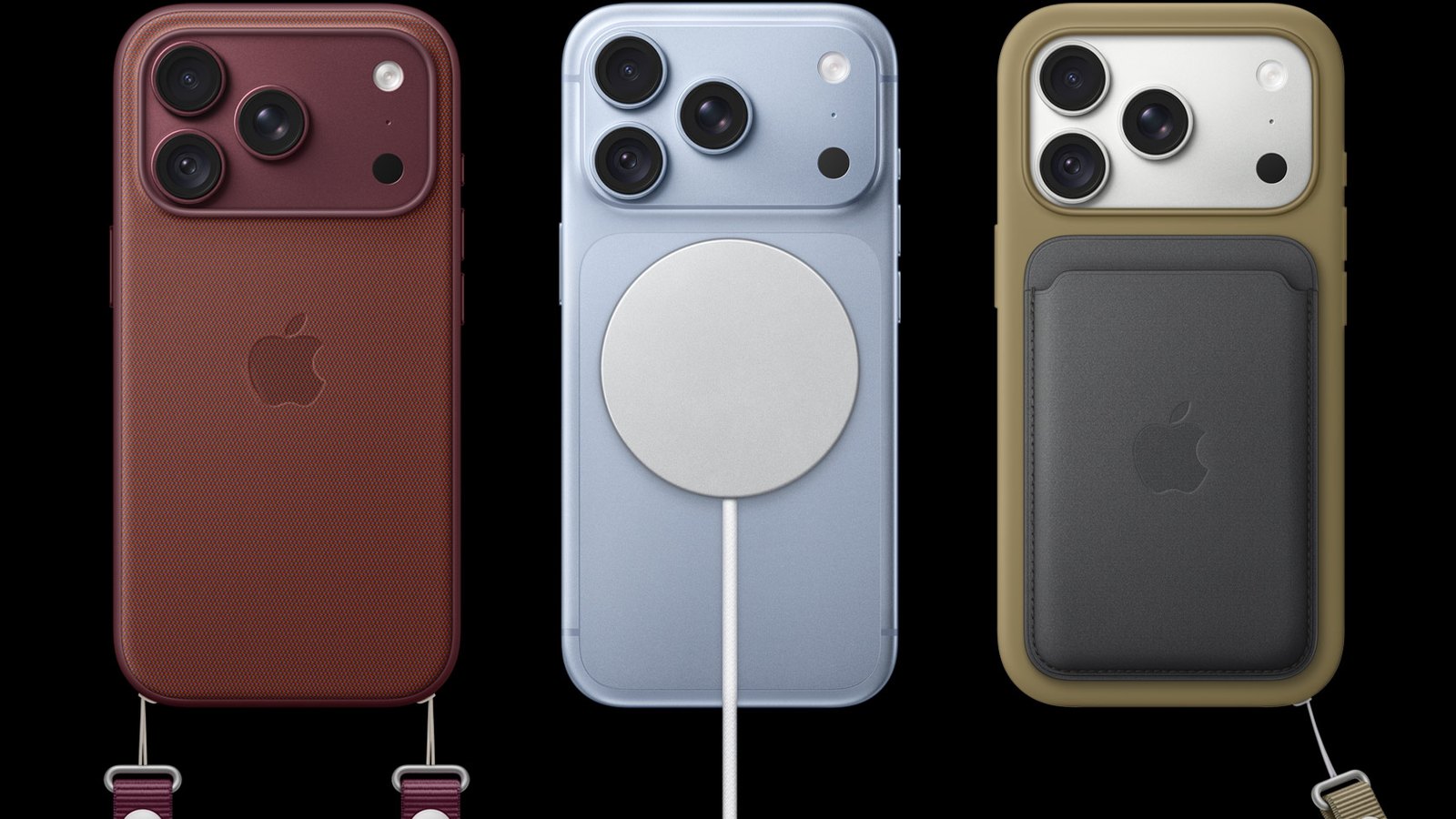
The short answer: which charger for the iPhone 18 Pro
- Fastest by cable: a USB-C power adapter of 60 W or more with AVS and a USB-C cable rated for 60 W. The result according to Apple: up to 50% in around 15 minutes.
- Wireless: a MagSafe or Qi2 25W charger (often listed as Qi2.2) of up to 25 W. The result according to Apple (with a MagSafe charger): up to 50% in 30 minutes with a 35 W or more powerful adapter.
- An old 20–45 W adapter without AVS: it will work and it’s safe, but Apple doesn’t promise 15 minutes with it.
- In the box: there’s only a 1 m USB-C cable, no power adapter.
- The iPhone 18 Pro and 18 Pro Max have identical charging specifications, so the same charger suits both.
See the full range of wall chargers at homescreen.pl.
Recommended chargers for the iPhone 18 Pro and 18 Pro Max: table
We chose the chargers based on the conditions Apple lists in its specifications: AVS and 60 W for cable charging, 25 W and a suitable adapter for MagSafe. Every feature in the table comes from the manufacturer’s description.
| # | Product | Type | What it gives the iPhone 18 Pro | Best for |
|---|---|---|---|---|
| 1 | Tech-Protect NCA100W-GaN-AVS | 100 W GaN wall charger, 2× USB-C + USB-A | AVS on the USB-C1 port, meets the 15-minute condition ✅ | most people |
| 2 | Tech-Protect PowerVision NC100W-GaN | 100 W GaN wall charger with a display | AVS on both USB-C ports, meets the 15-minute condition ✅, power readout | if you want to see the charging power |
| 3 | Spigen Essential EE472EU-GAN 47W | GaN wall charger, 2× USB-C | no AVS, but 15 V/3 A is enough for a 25 W MagSafe charger | powering a MagSafe charger |
| 4 | Tech-Protect A50 Qi2.2 | magnetic puck | up to 25 W wireless | desk, bedside table |
| 5 | Spigen Essential EF323MQ Qi2.2 | 3-in-1 station | up to 25 W for the phone | iPhone + Apple Watch + AirPods |
| 6 | Tech-Protect A51 ArcticBoost Qi2.2 | 3-in-1 station with a fan | up to 25 W, active cooling | if you charge wirelessly every day |
| 7 | Tech-Protect V21 Qi2.2 | car mount | up to 25 W, fan | the car |
| 8 | Tech-Protect PB40 LifeMag | 10,000 mAh power bank | up to 25 W wireless (Qi2.2) | on the go |
| 9 | UGREEN US535 | 240 W USB-C cable, 2 m | plenty of headroom above the required 60 W | a spare, longer cable |
You’ll see current prices in the product tiles below the following sections. They’re loaded from the shop the moment you open the page.
Wired charging on the iPhone 18 Pro: how much power makes sense
This is the biggest change to charging on the new iPhone Pro models. According to Apple’s specifications, the iPhone 18 Pro and 18 Pro Max charge to 50% in around 15 minutes with a 60 W or higher power adapter with adjustable voltage (AVS) and a USB-C cable. In a footnote, Apple clarifies that this refers to adapters compliant with USB Power Delivery (USB PD) 3.1 or later.
For comparison, Apple says the iPhone 17 Pro reaches 50% in around 20 minutes with a 40 W or more powerful adapter. On the iPhone 18 Pro page, Apple adds that 5 minutes of charging is enough for up to 7 hours of video playback on the iPhone 18 Pro Max.
Note one thing: 60 W is a requirement for the power adapter, not the power the phone draws. Apple doesn’t state the maximum wired charging power of the iPhone 18 Pro in watts. The figures circulating online don’t come from Apple, so we’re not repeating them.
What AVS is and how to spot it
AVS (Adjustable Voltage Supply) is a USB Power Delivery adapter mode in which the output voltage changes smoothly within a given range instead of jumping between the fixed values of 5, 9, 15 and 20 V. Apple states it plainly in the iPhone User Guide: fast charging the 18 Pro requires an AVS power adapter of at least 60 W and a USB-C cable rated for 60 W.
How to check it when buying:
- Look for the abbreviation AVS in the specifications or on the adapter’s housing, ideally with a voltage range, e.g. “AVS: 9–20 V”.
- PPS is not the same as AVS. PPS (Programmable Power Supply) is a different voltage-regulation mode in USB PD. Many chargers have it, including those for fast charging Samsung phones, but for the iPhone 18 Pro Apple lists only AVS.
- Check the power on a single port. “100 W” on the box is often the total across all ports.
- The benchmark is Apple’s 40 W Dynamic Power Adapter with 60 W Max. Among other things, Apple lists an AVS mode of 15–20 V at 2 A for it.
In our range, two chargers of 60 W and above list AVS in their specifications: both from Tech-Protect, described below. The popular UGREEN, Spigen and Satechi adapters we sell don’t mention AVS in their descriptions. They’ll charge the iPhone 18 Pro quickly and safely, but the manufacturers don’t confirm the condition on which Apple’s 15 minutes depend.
What wattage of power adapter for the iPhone 18 Pro: table
| Power adapter | Wired charging of the iPhone 18 Pro | 25 W MagSafe charger |
|---|---|---|
| 20 W USB-C PD | charges, but without the promised 15 minutes | ❌ too weak for 25 W |
| 30 W USB-C PD | charges, but without the promised 15 minutes | ✅ 25 W¹ |
| 35–47 W USB-C PD | charges, but without the promised 15 minutes | ✅ 25 W, 50% in 30 minutes² |
| 60 W and above without AVS | charges, Apple doesn’t promise 15 minutes | ✅ 25 W, 50% in 30 minutes² |
| 60 W and above with AVS | ✅ up to 50% in around 15 minutes | ✅ 25 W, 50% in 30 minutes² |
¹ For 25 W MagSafe charging, Apple requires a 30 W or more powerful adapter that delivers at least 15 V/2 A.
² Apple quotes 50% in 30 minutes for a 35 W or more powerful adapter.
1. Tech-Protect NCA100W-GaN-AVS: our pick
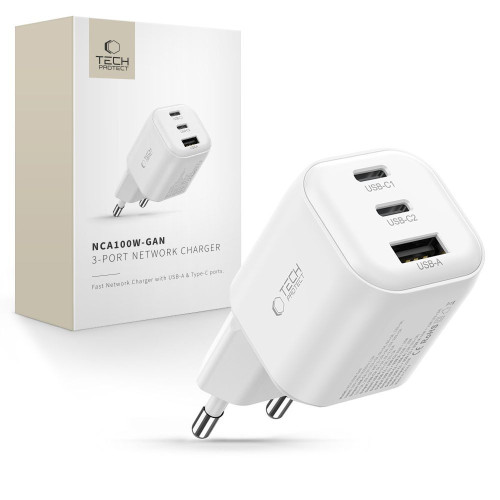
The best wired charger for the iPhone 18 Pro
This is a compact GaN charger with two USB-C ports and one USB-A port. GaN (gallium nitride) technology makes it possible to fit a lot of power into a small housing. The manufacturer lists support for USB PD 3.2 and AVS on the USB-C1 port, which delivers up to 100 W when used on its own. The AVS range is 9–15 V at 3 A and 15–20 V at 5 A, so Apple’s condition (60 W with AVS) is met with room to spare.
With several devices connected, the USB-C1 port holds 65 W, which is still above the threshold. After around 30 minutes under full load, the charger reduces its output to 65 W to avoid overheating. There’s also a black version.
Best for: most 18 Pro and 18 Pro Max owners. Plug the phone into the USB-C1 port and leave the second USB-C port for your earbuds or watch.
2. Tech-Protect PowerVision NC100W-GaN: with a power display
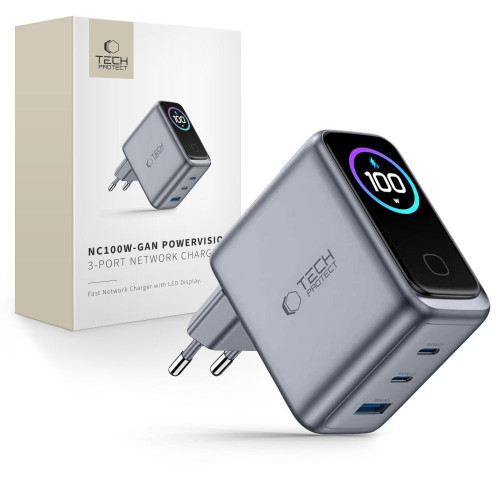
The best if you want to see the charging power
The PowerVision has AVS on both USB-C ports (9–20 V at 5 A, up to 100 W) as well as PPS. A small display shows the current power in watts and the temperature. It’s the simplest way to check whether a cable or a second connected device is reducing the power.
With two devices at once, the USB-C1 port gets 65 W and the other 30 W. Watch out for the smaller model: the PowerVision NC45W-GaN also has AVS, but only 45 W, which is below the 60 W threshold.
Best for: charging your phone and laptop from one adapter, or if you like to keep an eye on how much power your phone is charging at.
3. Spigen Essential EE472EU-GAN 47W: for a MagSafe charger
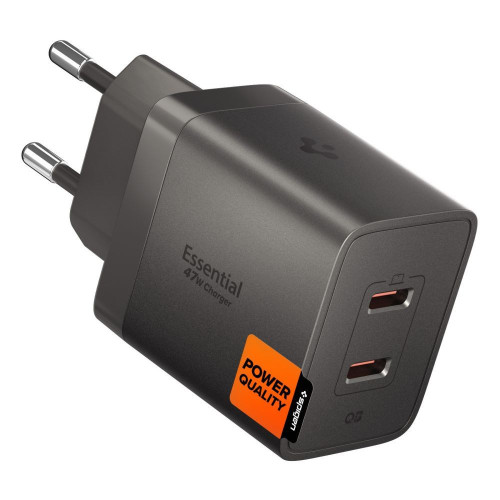
The best power adapter for a wireless charger
The Spigen doesn’t have AVS, so by cable it won’t deliver the promised 15 minutes. It does, however, have everything a MagSafe charger needs: 15 V at 3 A (45 W) on the first port and the full 47 W with a single device. So it meets both of Apple’s conditions: 30 W for 25 W MagSafe charging and 35 W for 50% in 30 minutes.
With two devices, the power is split into 27 W and 20 W, which is below the required 30 W, so connect the MagSafe charger when the second port is free. A cheaper alternative with a cable included is the Tech-Protect C35W with a USB-C cable: 35 W, two USB-C ports and a 1 m cable.
Best for: if you mostly charge your iPhone on a pad and want a small, proven adapter to power it.
[hs_products ids=”141260,142549,139064,65670″ cols=”4″ title=”Wall chargers for the iPhone 18 Pro”]
Cable: which USB-C cable for the iPhone 18 Pro
The cable in the box is 1 m long and meets Apple’s requirements. When buying a second one, follow the rule from the iPhone User Guide: the cable must be rated for 60 W or more. In practice, that means a USB-C to USB-C cable labelled 60 W (3 A) or higher.
- UGREEN US535 240 W, 2 m: 5 A, braided, a good length for the bed or sofa.
- Tech-Protect Ultraboost DNA 60 W, 1 m: exactly 60 W and 3 A, nylon braid, the cheapest of the three cables recommended here, good as a spare.
- Spigen Essential EB24012CC 240 W, 1.2 m: with an e-marker (a chip that tells the charger the cable’s parameters) and USB4 data transfer up to 40 Gb/s, if the cable will also be used for a laptop and monitor.
We cover choosing a cable in more detail in our guide on which cable to choose for fast charging. You’ll find the full range in the USB-C to USB-C cables category.
MagSafe vs Qi2 vs standard Qi: wireless charging on the iPhone 18 Pro
The iPhone 18 Pro and 18 Pro Max charge wirelessly at up to 25 W via MagSafe and up to 25 W via Qi2. That’s what Apple’s specifications say. So you don’t have to buy a charger with an Apple logo, but you do need to watch two things: the version of the standard and the power adapter.
| Charger | Power for the iPhone 18 Pro | Magnets | What to remember |
|---|---|---|---|
| Apple MagSafe (A2580, A3250, A3502, A3503) | up to 25 W | ✅ | adapter of at least 30 W and 15 V/2 A |
| Qi2 25W (also listed as Qi2.2) | up to 25 W | ✅ | adapter as specified by the charger, usually 30–45 W |
| Qi2 from 2023 | up to 15 W¹ | ✅ | it works, but more slowly |
| Apple MagSafe from 2020 (A2140) | below 25 W² | ✅ | Apple doesn’t list it for 25 W |
| standard Qi | no data³ | ❌ | usually the slowest; the phone has to be placed precisely over the coil |
¹ According to the Wireless Power Consortium, the first version of Qi2 from 2023 delivered 15 W, and Qi2 25W is the marketing name for Qi version 2.2.1.
² Apple lists the A2140 charger only in the table for charging at up to 15 W.
³ Apple doesn’t state the power for standard Qi in the iPhone 18 Pro specifications.
A few rules worth knowing:
- By cable with a 60 W AVS adapter, you’ll charge the battery to half twice as fast. According to Apple, that’s 50% in around 15 minutes wired versus 30 minutes via MagSafe.
- Connect the power adapter before putting the phone down. Apple recommends plugging the MagSafe charger into power first. If you do it the other way round, remove the phone, wait three seconds and put it back to regain full power.
- A connected USB-C accessory lowers MagSafe power to 16 W. That’s what Apple states for the 18 Pro when you plug, for example, wired headphones into the port.
- “25 W” in the name of a 3-in-1 station doesn’t always mean 25 W for the phone. According to its description, the Satechi 3-in-1 Qi2 25W gives the iPhone 15 W. Look in the specifications for the line with the output power for the phone (e.g. “Output – smartphone”).
You’ll find a broader overview of this category in our guide on which MagSafe charger to choose. If you’re worried about the new camera aperture, read whether MagSafe harms the iPhone 18 Pro’s camera.
4. Tech-Protect A50 Qi2.2: a 25 W magnetic puck
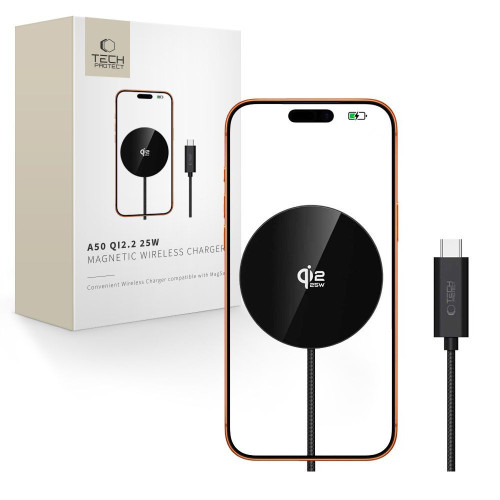
The best single wireless charger
The simplest form: a Qi2.2 magnetic puck of up to 25 W with several power profiles (5, 7.5, 10, 15 and 25 W). A 116 cm braided USB-C cable is included; the power adapter has to be bought separately.
If you prefer a permanently attached cable, choose the Tech-Protect A54 Qi2.2 with a 150 cm braided cable. The manufacturer recommends an adapter of at least 30 W for it.
Best for: the desk and bedside table, if you only charge your phone.
5. Spigen Essential EF323MQ Qi2.2: 3-in-1 station
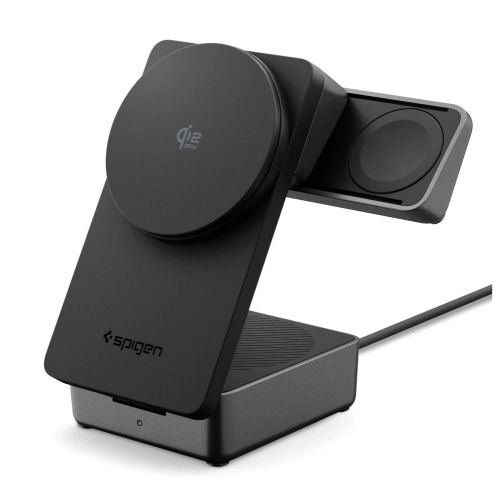
The best 3-in-1 station
The phone gets up to 25 W via Qi2.2, the watch 2.5 W and the earbuds 5 W. You can adjust the tilt angle between 45 and 60°, and a sliding watch module lets you switch the station into 2-in-1 mode. A 2 m USB-C cable is included.
Spigen recommends an adapter of at least 45 W, so the Tech-Protect NCA100W or Spigen EE472EU, for example, will be fine for powering the station. Best for: if you charge your iPhone, Apple Watch and AirPods in one place every evening.
6. Tech-Protect A51 ArcticBoost Qi2.2: 3-in-1 with a fan
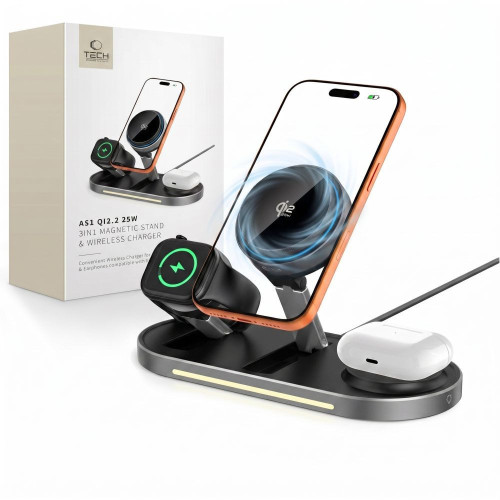
The best for battery health with daily wireless charging
The A51 gives the phone up to 25 W and has active cooling in its base: a quiet turbine fan and a heat-dissipating plate. Heat is the battery’s main enemy (more on this in the safety section), so with daily wireless charging, cooling is a real advantage.
The manufacturer recommends an adapter of at least 45 W. For travel, the foldable Ringke Qi2.2 25W 3in1 Folding, which weighs 134 g, is a better choice. If you only charge your iPhone and watch, the Tech-Protect A55 2in1 is enough.
[hs_products ids=”134148,141896,127990,137939,127530,142481″ cols=”3″ title=”MagSafe and Qi2.2 25 W chargers for the iPhone 18 Pro”]
You’ll find the full range in the wireless chargers category.
Will a charger from the iPhone 17 Pro or 16 Pro work with the 18 Pro?
Yes, any existing USB-C charger will charge the iPhone 18 Pro safely. The only question is how fast. The port hasn’t changed and the MagSafe magnets are in the same place. We covered this in our article on whether an iPhone 17 Pro case fits the 18 Pro.
You can check the wattage of an Apple power adapter on its housing. The model number of a MagSafe charger is on the charger itself or on the cable.
| What’s in your drawer | By cable to the iPhone 18 Pro | For a MagSafe charger | Verdict |
|---|---|---|---|
| Apple 20 W power adapter | charges, but without the promised 15 minutes | ❌ below 30 W | fine overnight |
| Apple 30 W power adapter | charges, but without the promised 15 minutes | ✅ 25 W | good for MagSafe |
| Apple 35 W Dual USB-C Port power adapter | charges, but without the promised 15 minutes | ✅ 25 W, 50% in 30 minutes | good for MagSafe |
| Apple 40 W Dynamic Power Adapter with 60 W Max | ✅ up to 50% in around 15 minutes | ✅ 25 W, 50% in 30 minutes | don’t buy anything |
| Third-party 40–65 W charger without AVS | charges, Apple doesn’t promise 15 minutes | ✅ 25 W, 50% in 30 minutes | good enough, unless you’re counting minutes |
| MagSafe charger A2580, A3250, A3502 or A3503 | — | ✅ up to 25 W | keep it |
| MagSafe charger A2140 | — | below 25 W | worth replacing |
The most important row is Apple’s 40 W Dynamic Power Adapter with 60 W Max (model A3351). It’s the same adapter Apple used to test fast charging on the iPhone 18 Pro. If you bought it together with the iPhone 17 Pro, you already have a charger that will charge the 18 Pro at full speed.
A charger bought from our ranking of chargers for the iPhone 17 will work with the 18 without any problem, but if it doesn’t have AVS, it won’t deliver the promised 15 minutes. We’ve gathered all the differences between the generations in our iPhone 18 Pro vs iPhone 17 Pro comparison.
Is it worth buying a charger with AVS? Yes, if you often top up your phone on the go, e.g. before heading out or at the airport. If you charge overnight or on a pad, AVS makes no practical difference. Apple quotes a time to 50% for only two configurations: around 15 minutes by cable with a 60 W AVS adapter, and 30 minutes with a MagSafe charger and a 35 W or more powerful adapter. Apple doesn’t give a time for adapters without AVS.
Charging in the car and from a power bank
The car chargers in our range don’t mention AVS in their descriptions, so don’t count on 15 minutes in the car. A mount with Qi2.2 charging, on the other hand, delivers the full 25 W wirelessly and holds the phone by the MagSafe ring, away from the camera bump.
7. Tech-Protect V21 Qi2.2: a mount with 25 W charging
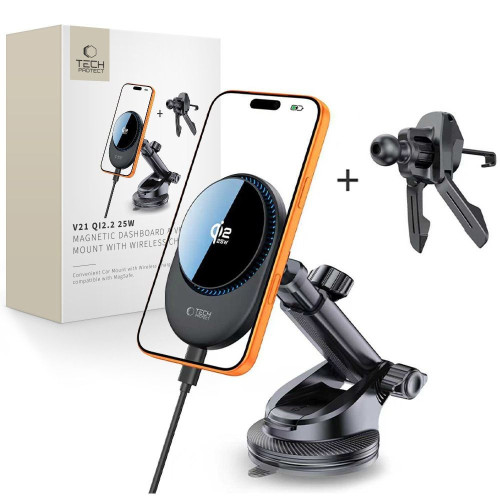
You can mount the V21 on the dashboard, the windscreen or an air vent. It has strong N52 magnets, a built-in fan and Qi2.2 charging at up to 25 W. On the input side it accepts, among other things, 15 V at 3 A, i.e. 45 W, so for the full 25 W it needs a powerful USB-C PD car charger, e.g. the UGREEN EC705 with a total output of 130 W.
Prefer a vent-only mount? The Spigen Essential EV25MFAQ has 25 W Qi2.2 and Peltier cooling (an active cooling module), handy in a hot car in summer. We describe more options in our guide to fast car chargers.
8. Tech-Protect PB40 LifeMag: a 25 W Qi2.2 power bank
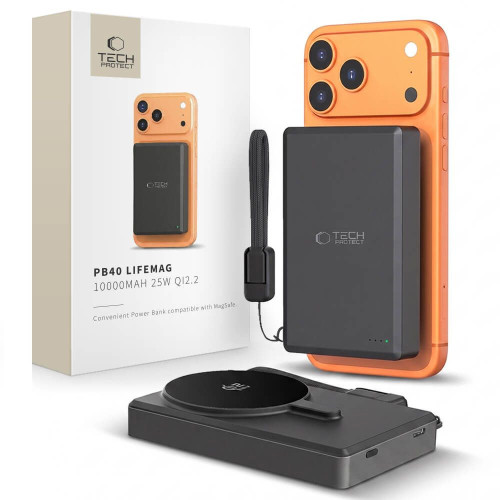
The PB40 has a capacity of 10,000 mAh (38.5 Wh), certified Qi2.2 wireless charging at up to 25 W and a USB-C port with up to 45 W output. You attach it to the back of the phone and charging starts automatically. Charging over a USB-C cable is faster, but 45 W is less than the required 60 W with AVS, so don’t count on 15 minutes here either.
We’ve gathered more models in our 2026 power bank ranking, and you’ll find magnetic ones in the MagSafe power bank category.
[hs_products ids=”135596,126193,74447,141166,35345,100784″ cols=”3″ title=”On-the-go charging and cables for the iPhone 18 Pro”]
Battery safety: does MagSafe damage the iPhone’s battery?
No, MagSafe doesn’t damage the battery. What harms the battery is heat, and wireless charging warms the phone more than a cable does. Apple states plainly that the iPhone and MagSafe charger may get slightly warm while charging. When the battery gets too warm, the system may hold charging above 80% to extend its lifespan.
What Apple says about temperature:
- The ideal ambient temperature is 16–22°C. Above 35°C, the battery can permanently lose some of its capacity.
- Charging in high temperatures does more damage than simply being somewhere warm.
- Some cases are worth removing while charging if the phone gets noticeably warm in them.
A powerful wall charger isn’t a threat either. Apple allows you to charge the iPhone with iPad and Mac power adapters, as well as third-party adapters, provided they meet applicable safety standards. The phone and charger negotiate the power via USB Power Delivery, so the iPhone draws only as much as it needs.
Five everyday rules:
- Set a charge limit. On the iPhone 15 and later, you can choose a limit from 80 to 100% in 5-percentage-point steps in Settings (Battery, Charging). With the limit set to 100%, Optimised Battery Charging is also available.
- Don’t charge in a hot car or in the sun. If you charge your phone in the car in summer, choose a mount with cooling, e.g. the Tech-Protect V21 or Spigen EV25MFAQ.
- A slower charger is enough overnight. Fast charging comes in handy during the day, when every minute counts.
- Don’t put cards between the phone and the MagSafe charger. Apple warns that the magnet can damage magnetic strips and RFID chips in cards.
- Buy Qi2.2-certified chargers and branded power adapters with protection against overheating and overvoltage.
Also remember that MagSafe magnets aren’t a problem for the camera, as long as the accessory attaches to the ring in the middle of the back panel. We explain this in our article on MagSafe and the iPhone 18 Pro’s aperture. You’ll find cases with a built-in magnetic ring in our ranking of iPhone 18 Pro cases.
Summary
- Which charger for the iPhone 18 Pro? A USB-C one of 60 W or more with AVS. Then Apple promises 50% in around 15 minutes. Our pick is the Tech-Protect NCA100W-GaN-AVS.
- For wireless charging, choose a MagSafe or Qi2 25W (Qi2.2) charger and a 35 W or more powerful adapter. With a MagSafe charger, Apple quotes 50% in 30 minutes.
- Your old adapter is enough if you’re not counting minutes. Apple’s 40 W Dynamic Power Adapter with 60 W Max delivers full speed.
- The cable must be rated for 60 W or more. The cable in the box meets this requirement.
- Heat harms the battery, not MagSafe. Set a charge limit and don’t charge your phone in the sun.
You’ll find the full range in the wall chargers and wireless chargers categories. We’ve gathered cases, screen protectors and camera protectors in the iPhone 18 Pro and iPhone 18 Pro Max categories.
FAQ: frequently asked questions
How many watts does a charger for the iPhone 18 Pro need?
For the fastest charging, you need a power adapter of at least 60 W with AVS support. With an adapter like this, Apple quotes 50% battery in around 15 minutes. Less powerful USB-C chargers will work too, just more slowly.
Is a 20 W charger enough for the iPhone 18 Pro?
It’s enough, but it won’t deliver Apple’s promised 50% in around 15 minutes. With a MagSafe charger it won’t deliver the full 25 W either, because Apple requires an adapter of at least 30 W for that.
Is a 67 W charger good for the iPhone 18 Pro?
Yes, it’s safe, because the phone draws only as much power as it needs. However, only count on 50% in around 15 minutes if the manufacturer lists AVS support in the specifications.
Does MagSafe damage the iPhone’s battery?
No. Wireless charging warms the phone more, but the iPhone has safeguards: if the battery is too warm, it may hold charging above 80%. Avoid charging in the sun and in a hot car.
Does the iPhone 18 Pro need an original Apple charger?
No. Apple allows third-party power adapters that comply with safety standards. For the fastest charging, choose a 60 W or more powerful model with AVS, e.g. the Tech-Protect NCA100W-GaN-AVS.
Does the iPhone 18 Pro come with a charger?
No. The box contains only a 1 m USB-C charging cable. The power adapter has to be bought separately.
Will a charger for the iPhone 18 Pro work with the 18 Pro Max?
Yes. Apple lists the same specifications for both models: 50% in around 15 minutes by cable with a 60 W AVS adapter, and up to 25 W via MagSafe and Qi2.
Will a MagSafe charger from the iPhone 16 or 17 work with the 18 Pro?
Yes. The A2580, A3250, A3502 and A3503 MagSafe chargers give the iPhone 18 Pro up to 25 W with an adapter of at least 30 W. The oldest MagSafe charger, the A2140, will also work, but more slowly.
Sources: iPhone 18 Pro and 18 Pro Max specifications, Apple: power adapters for iPhone, Apple: how to use a MagSafe charger with iPhone, Apple: maximising battery performance, Wireless Power Consortium: Qi2 25W press release. Product features come from the manufacturers’ descriptions at homescreen.pl.
Leave a Reply