Kategori: No category

  • Vivo V70 and V70 FE – premiere in Poland, price and comparison

    Vivo V70 and V70 FE – premiere in Poland, price and comparison

    Vivo V70 to smartphone z procesorem Snapdragon 7 Gen 4, potrójnym aparatem ZEISS z peryskopowym teleobiektywem 3x i ekranem 5000 nitów — w cenie 3099 zł (promo 2699 zł). Vivo V70 FE oferuje sensor 200 MP, baterię 7000 mAh i obudowę świecącą w ciemności za 2099 zł (promo 1799 zł). Oba modele mają certyfikat IP68/IP69, ładowanie 90 W i Android 16.
    Vivo V70 i Vivo V70 FE trafiają do polskiej sprzedaży w 2026 roku jako jedne z najciekawszych propozycji w segmencie średniej półki. Oba modele łączy certyfikat IP68/IP69, szybkie ładowanie 90 W i system Android 16, ale poza tym to dwa zupełnie różne smartfony — skierowane do innych użytkowników.

    Vivo V70 stawia na aparat ZEISS z teleobiektywem peryskopowym i szybszą pamięć UFS 4.1. Model V70 FE (Fashion Edition) odpowiada baterią 7000 mAh, większym ekranem 6,83 cala i sensorem 200 MP — w niższej cenie. Który pasuje do Ciebie? Porównajmy.

    Vivo V70 vs V70 FE — key differences

    Before we get into the details, here are the key differences in one table:

    ParameterVivo V70Vivo V70 FE
    ProcessorSnapdragon 7 Gen 4 (4 nm)Dimensity 7360 Turbo (4 nm)
    Display6.59″ AMOLED, 5000 nits peak6.83″ AMOLED, 1900 nits
    Main camera50 MP ZEISS, f/1.9, OIS200 MP Samsung HP5, f/1.9, OIS
    Telephoto50 MP periscope, 3x zoom, ZEISSnone
    Ultrawide8 MP ZEISS8 MP
    Selfie50 MP AF, ZEISS32 MP AF
    Battery6500 mAh7000 mAh
    Charging90 W90 W
    MemoryUFS 4.1 + LPDDR5XUFS 3.1 + LPDDR5
    Video4K @ 60 fps4K @ 30 fps
    Weight187 g200 g
    ResistanceIP68/IP69IP68/IP69
    Price in Poland3099 zł (promo 2699 zł)2099 zł (promo 1799 zł)

    In short: V70 has a better camera and faster processor for a higher price. V70 FE offers a larger battery and screen for a thousand zł less.

    Vivo V70 specifications

    ParametrVivo V70
    Wyświetlacz6,59″ AMOLED, 1260 x 2750 px (1,5K), 120 Hz, HDR10+, 5000 nitów
    ProcesorQualcomm Snapdragon 7 Gen 4 (4 nm)
    RAM / Pamięć8/256 GB, 12/256 GB lub 8/512 GB (LPDDR5X + UFS 4.1)
    Aparat główny50 MP ZEISS, 1/1,56″, f/1.9, OIS
    Teleobiektyw50 MP ZEISS peryskopowy, 3x zoom optyczny, OIS
    Ultraszerokokątny8 MP ZEISS, f/2.2, 115°
    Aparat przedni50 MP ZEISS, f/2.0, AF, 92°
    Bateria6500 mAh (Si/C), 90 W
    SystemAndroid 16 + OriginOS 6
    Łączność5G, Wi-Fi 7, Bluetooth 5.4, NFC, IR
    OdpornośćIP68 + IP69
    Wymiary i waga157,5 x 74,3 x 7,4 mm, 187 g
    KoloryGolden Hour, Alpine Gray

    Specyfikacja Vivo V70 FE

    ParametrVivo V70 FE
    Wyświetlacz6,83″ AMOLED, 1260 x 2800 px (1,5K), 120 Hz, HDR10+, 1900 nitów
    ProcesorMediaTek Dimensity 7360 Turbo (4 nm)
    RAM / Pamięć8/256 GB, 12/256 GB lub 8/512 GB (LPDDR5 + UFS 3.1)
    Aparat główny200 MP Samsung HP5, 1/1,56″, f/1.9, OIS
    Ultraszerokokątny8 MP, f/2.2, 120°
    Aparat przedni32 MP, f/2.2, Eye AF
    Bateria7000 mAh (Si/C), 90 W
    SystemAndroid 16 + OriginOS 6
    Łączność5G, Wi-Fi, Bluetooth 5.4, NFC, IR
    OdpornośćIP68 + IP69
    Wymiary i waga163,7 x 76,2 x 7,6 mm, 200 g
    KoloryOcean Blue, Muse Purple, Titanium Silver

    Aparat Vivo V70 — ZEISS z zoomem czy 200 MP?

    To największa różnica między tymi modelami i jednocześnie najważniejsze kryterium wyboru.

    Vivo V70 oferuje potrójny system ZEISS z teleobiektywem peryskopowym 50 MP i 3-krotnym zoomem optycznym — coś, co w cenie poniżej 3500 zł praktycznie nie istnieje u konkurencji. Optyka ZEISS jest obecna we wszystkich czterech obiektywach (trzy z tyłu + selfie), a wideo nagrywa w 4K przy 60 kl./s z podwójną stabilizacją OIS + EIS. Teleobiektyw sprawdza się przy portretach, zdjęciach z koncertów i fotografii ulicznej — daje naturalną kompresję perspektywy bez cyfrowych artefaktów.

    Vivo V70 FE focuses on raw resolution — the Samsung HP5 200 MP sensor with a 1/1.56 inch matrix. In good light, photos are full of details, especially in cropped landscape shots. The 30x SuperZoom feature uses excess pixels for digital zooming, but the quality at higher zoom levels does not match the optical telephoto lens of the V70. There is also no separate telephoto lens and ZEISS branding.

    Additionally, there are AI features common to both models:

    • AI Night Mode — frame merging for night photos with noise reduction
    • AI Portrait — background blur with precise subject cutout
    • Scene Detection — automatic recognition of scene types

    Tip: If you often take photos from a distance (concerts, sports, children at the playground), the telephoto lens in the V70 is a game-changer. If you prefer cropping from large files or mainly take selfies and landscapes — the V70 FE will suffice.

    Performance — Snapdragon 7 Gen 4 vs Dimensity 7360 Turbo

    Vivo V70 is powered by Snapdragon 7 Gen 4 — the latest Qualcomm chip manufactured using a 4 nm process. In the AnTuTu benchmark, it scores over 1.48 million points, placing it clearly above typical mid-range devices. The Adreno 722 GPU allows playing Genshin Impact and PUBG at high settings. The UFS 4.1 storage means faster file read and write speeds — applications launch noticeably smoother than on UFS 3.1.

    Vivo V70 FE features Dimensity 7360 Turbo — a solid but slower processor. In everyday use — browsing, social media, navigation — the difference is negligible. The gap widens in gaming and multitasking. The UFS 3.1 and LPDDR5 (without X) memory is from an earlier generation.

    Both models have a VC (Vapor Chamber) cooling system and run on Android 16 with the OriginOS 6 overlay. The manufacturer promises 4 years of system updates and 6 years of security patches. Shared additional features include infrared port (IR), NFC, and Bluetooth 5.4 — the V70 adds Wi-Fi 7 to this.

    Bateria — 6500 vs 7000 mAh

    Both models use silicon-carbon (Si/C) cells, which are denser in energy than traditional lithium-polymer ones. The 90 W FlashCharge charges the battery from 0 to 100% in about an hour in both cases.

    V70 FE wins in capacity — 7000 mAh is one of the largest batteries in the segment. The portal GSMArena awarded a result of over 67 hours of endurance. With moderate use, that’s over two days without charging.

    V70 with a 6500 mAh battery also performs very well — it easily lasts a whole day of intensive use. The smaller capacity is compensated by a more energy-efficient Snapdragon processor and a smaller display.

    To charge both models, you need a USB-C cable and a wall charger with a minimum power of 90 W. For longer trips, it’s worth getting a power bank.

    Wyświetlacz Vivo V70 i V70 FE

    Both panels are AMOLED 1.5K with 120 Hz refresh rate and HDR10+, but they differ in details.

    V70 has a smaller screen 6.59 inches, but brighter — peak brightness reaches 5000 nits, which is a flagship-level result. Schott Xensation Core glass protects the display.

    V70 FE offers a larger screen 6.83 inches with a brightness of 1900 nits — still readable in sunlight, but the difference in direct comparison with V70 is noticeable. The 10-bit panel displays a billion colors in the P3 palette.

    Good to know: If you often use your phone outdoors, 5000 nits in V70 makes a huge difference in readability in full sunlight.

    Design and durability

    Vivo V70 is compact — 157.5 x 74.3 mm and only 187 g. The aluminum frame with a glass or plastic body (depending on the variant) makes it feel secure in hand. Available colors are Golden Hour (sunset gradient) and Alpine Gray.

    Vivo V70 FE is the Fashion Edition — 163.7 x 76.2 mm and 200 g. It features Darkness Glow technology: the rear panel in the Muse Purple variant absorbs light and glows in the dark, changing color. Ocean Blue has similar luminescent properties. Despite the 7000 mAh battery, the casing is only 7.6 mm thick.

    Both models have an IP68 + IP69 certification — complete dustproofing and resistance to immersion up to 1.5 m. IP69 indicates additional resistance to water under pressure — a rarity in this price range. Nevertheless, it is worth securing the device — cases and accessories for Vivo V protect the AMOLED display from scratches, which the IP certification does not help against.

    Price of Vivo V70 and V70 FE in Poland

    ModelRegular pricePromotional priceVariant
    Vivo V703099 zł2699 zł8/512 GB
    Vivo V70 FE2099 zł1799 zł8/256 GB

    The difference is one thousand zlotys — and this is the key question: is the ZEISS telephoto lens, faster processor, and brighter screen worth the additional 1000 zł?

    For comparison with the competition:

    ModelPrice in PolandHighlight
    Vivo V703099 złZEISS telephoto, Snapdragon 7 Gen 4
    Vivo V70 FE2099 zł200 MP, 7000 mAh battery
    Samsung Galaxy A56~1999 zł7 years of updates, One UI
    Xiaomi Redmi Note 15 Pro+~1599 zł200 MP, Dimensity 7400 Ultra

    According to the portal GSMManiak, both models are available in Polish stores (Media Expert, RTV Euro AGD, Neonet) with promotional starting prices.

    Which to choose? Vivo V70 or V70 FE

    Choose Vivo V70 if:
    – You take a lot of photos and need a telephoto lens (portraits, sports, concerts)
    – You care about the best gaming performance
    – You prefer a compact smartphone (6.59″, 187 g)
    – Screen brightness is important to you (5000 nits)

    Choose Vivo V70 FE if:
    – Battery life is a priority (7000 mAh)
    – You prefer a larger screen (6.83 inches)
    – You want to save 1000 PLN
    – You don’t need a telephoto lens — digital zoom from the 200 MP sensor is enough for you

    Our choice: For most users, Vivo V70 FE for 1799 PLN (on promotion) offers a better price-to-quality ratio. The telephoto lens on the V70 is great, but the additional 900 PLN is a significant expense if you’re not a photography enthusiast.

    Summary

    Vivo V70 and V70 FE are two thoughtfully designed smartphones targeting different needs. V70 is aimed at photographers — featuring a triple ZEISS camera with a 3x periscope telephoto lens and Snapdragon 7 Gen 4 for 3099 PLN. V70 FE focuses on durability — 7000 mAh, 200 MP sensor, and Darkness Glow casing for 2099 PLN.

    Both models share an IP68/IP69 rating, 90 W fast charging, Android 16, and solid build quality. Regardless of your choice, it’s worth taking care of protection — check out Vivo smartphone accessories at homescreen.pl.

    FAQ

    How much does Vivo V70 cost in Poland?

    The official price of Vivo V70 in Poland is 3099 PLN for the 8/512 GB variant. The promotional starting price drops to 2699 PLN. The V70 FE model costs 2099 PLN (promo 1799 PLN) for the 8/256 GB variant.

    What is the difference between Vivo V70 and V70 FE?

    V70 has a faster processor (Snapdragon 7 Gen 4), a triple ZEISS camera with a 3x periscope telephoto lens, and a brighter screen (5000 vs 1900 nits). V70 FE offers a larger battery (7000 vs 6500 mAh), a higher camera resolution (200 vs 50 MP), and a lower price.

    Does Vivo V70 have a telephoto lens?

    Yes — Vivo V70 has a 50 MP periscope telephoto lens with ZEISS optics and 3x optical zoom. It is one of the few mid-range phones with a telephoto lens in this price range. The V70 FE model does not have a telephoto lens.

    Which model has a better camera?

    It depends on the photography style. Vivo V70 wins in versatility — ZEISS telephoto lens, better 4K@60fps video, and ZEISS optics on all lenses. V70 FE offers a higher resolution of 200 MP, which provides more detail in good light and better digital zoom.

    Are Vivo V70 and V70 FE waterproof?

    Yes — both models have an IP68 rating (submersion up to 1.5 m) and IP69 (resistance to water under pressure). This is one of the highest resistance standards in the mid-range segment.

  • Multimedia screen film – ranking of the best films 2026

    Multimedia screen film – ranking of the best films 2026

    The best multimedia screen film in a car is GrizzGlass CarDisplay Protection in ceramic version (from 109.99 PLN) — it protects the display from scratches, maintains full touch responsiveness, and does not change the colors of the image. For drivers who are bothered by sunlight glare, the matte version with an anti-reflective filter will be better. In the ranking, we included films for car screens dedicated to specific models with precise laser cuts.

    Multimedia screens in modern cars have increasingly larger diagonals — from 9 to even 17 inches. At the same time, they are exposed to scratches from rings, nails, and keys. Replacing a damaged display at an authorized service center costs around 3,000–8,000 PLN.

    A protective film for the screen for a fraction of that amount solves the problem once every few years. In this article, we compare the best car screen films available in 2026, test the differences between the ceramic and matte variants, and suggest which film for the car display will work best in your vehicle.

    Why is it worth protecting the multimedia screen in the car?

    Car displays operate under much harsher conditions than smartphone screens. They are exposed to large temperature fluctuations — from freezing in winter to over 60°C in summer in the sun. Additionally, you operate them while wearing gloves, with dirty hands after refueling, or with shopping bags in your hands.

    The scratched multimedia screen not only looks worse but also makes it difficult to read navigation and information from the onboard computer. In premium cars, where the infotainment system costs several thousand zlotys, a protective film for the screen is a cheap insurance policy.

    The film for the car display also provides additional benefits:

    • Reduction of sun glare (matte versions)
    • Protection against fingerprints and greasy stains
    • Preservation of the car’s value during resale or lease return
    • Easier screen cleaning thanks to the oleophobic coating
    • Protection against overheating — ceramic film filters some UV radiation

    Types of protective films for car screens

    Before you move on to the ranking of multimedia screen films, it is worth knowing the differences between the available types. Each variant has its strengths and will perform well in different situations — just like with protective films for smartphone screens, the choice depends on your priorities.

    Ceramic film

    Ceramic film is a solution for those who want screen protection without changing the appearance of the display. The ceramic layer effectively absorbs impacts and scratches while maintaining 100% transparency and natural colors. The touch remains just as responsive as on a bare screen.

    Ceramic film for multimedia screens is particularly suitable for cars with high-quality OLED or AMOLED displays, where you care about faithful color reproduction — e.g., in navigation systems with satellite views. This is the most commonly chosen type of protective film for screens in new cars.

    Matte film (anti-reflective)

    Matte film for screens is a choice for drivers who drive a lot on sunny days. The surface with an anti-reflective filter eliminates light reflections, ensuring that navigation and multimedia remain readable even in bright sunlight. An additional plus — the matte texture reduces the visibility of fingerprints.

    The disadvantage of matte film is a slight dulling of the image. Colors lose some saturation, and fine details on the map may be minimally less sharp. In practice, the difference is noticeable mainly when directly compared to a bare screen. Matte film on a car screen works best in SUVs with panoramic roofs and convertibles.

    PPF Film (Paint Protection Film)

    PPF film on the screen is a premium solution, known mainly for protecting car paint. It has self-healing properties — minor scratches disappear under the influence of heat. It is thicker than ceramic and matte films, which translates into better mechanical protection of the display.

    It is worth knowing that not every PPF film is suitable for touch screens. Choose only variants designed for car displays that maintain touch responsiveness and do not interfere with sensor operation. PPF film for multimedia screens usually costs more than ceramic variants, but offers the highest durability.

    What to pay attention to when choosing a film for a car screen?

    When purchasing protective film for a multimedia screen, check a few key parameters. Choosing the right film for a car display ensures that the protection will be effective and will not worsen the comfort of using the screen.

    • Fit to model — the film for the car screen must be precisely cut for your display. Universal films cut with scissors never fit as well as dedicated laser-cut templates.
    • Thickness — thinner films (0.1–0.15 mm) are less noticeable to the touch, thicker ones (0.2+ mm) provide better mechanical protection.
    • Oleophobic coating — repels grease and makes it easier to clean the multimedia screen from fingerprints.
    • Touch responsiveness — check if the manufacturer guarantees 100% sensitivity of the touch screen.
    • Installation kit — a good protective film for the screen should include a cloth, squeegee, and cleaning solution.
    • Surface hardness — films with a hardness of 9H provide protection against scratches from keys and coins.

    Tip: Before applying the film to the multimedia screen, turn off the engine and wait for the display to cool to room temperature. A warm screen makes precise application difficult and can cause air bubbles.

    Ranking of multimedia screen films 2026

    Below we present the best protective films for car screens available at homescreen.pl in the category car accessories. All products are from the GrizzGlass CarDisplay Protection series — the only brand with dedicated laser cutting dies for over 6,000 car models. Therefore, in our ranking of multimedia screen films, we focus specifically on this series.

    1. GrizzGlass CarDisplay Protection ceramic for Audi Q3 (2025–2026) — 199.99 zł

    Best premium protection — ceramic film dedicated to the new Audi Q3 with a large 10.1 inch MMI multimedia screen. The ceramic layer provides effective protection against scratches without changing the display colors. The flexible material perfectly adheres to the curved panel.

    GrizzGlass ceramic technology stands out for its lack of optical distortions. The image on the screen looks identical to without the film — which you will especially appreciate in the MMI system with high-resolution graphics. The higher price results from the larger protective area covering the climate control panel.

    2. GrizzGlass CarDisplay Protection ceramic for VW T-Roc 2 12.9″ (2025–2026) — 129.99 zł

    The best film for the car screen from the VAG group — the new second-generation T-Roc features an impressive 12.9-inch display. The ceramic film protects it from scratches in everyday use while maintaining full brightness and color saturation.

    The precise laser cut ensures a perfect fit of the film to the shape of the multimedia screen — without the need for self-trimming. The installation kit included makes application easy even for those without experience in applying protective films.

    3. GrizzGlass CarDisplay Protection matowa do Tesla Model Y Juniper — tylny ekran (2024–2025) — 129,99 zł

    Najlepsza matowa folia na ekran do Tesli — tylny ekran w odświeżonym Model Y Juniper jest szczególnie narażony na zabrudzenia od pasażerów. Matowa powierzchnia skutecznie redukuje odblaski i odciski palców, co docenią zwłaszcza dzieci korzystające z ekranu multimedialnego na tylnej kanapie.

    Tesla to samochód, w którym wyświetlacz pełni rolę centrum sterowania — od klimatyzacji po otwieranie bagażnika. Folia ochronna na ekran jest tu absolutną koniecznością. GrizzGlass oferuje folie zarówno na przedni, jak i tylny wyświetlacz Tesli we wszystkich generacjach.

    4. GrizzGlass CarDisplay Protection ceramiczna do BMW 7 G11/G12 10,25″ (2015–2023) — 119,99 zł

    Folia ceramiczna dedykowana do ekranu iDrive w BMW serii 7. Format 10,25 cala to jeden z najpopularniejszych rozmiarów wyświetlaczy samochodowych w autach BMW — ta sama folia na ekran multimedialny pasuje do wielu modeli z systemem iDrive 7. Ceramiczny materiał nie wpływa na działanie gestów i dotyku wielopunktowego.

    BMW serii 7 to samochód z segmentu premium, w którym zarysowany ekran obniża wartość auta przy odsprzedaży. Folia ochronna na ekran za 119,99 zł to minimalna inwestycja w porównaniu z wymianą wyświetlacza za kilka tysięcy złotych w autoryzowanym serwisie.

    5. GrizzGlass CarDisplay Protection matowa do Skoda Scala 9,2″ Amundsen (2019–2023) — 109,99 zł

    Folia matowa na ekran systemu Amundsen 9,2 cala w Skodzie Scala — jedna z najtańszych folii w rankingu. Antyodblaskowa powierzchnia sprawia, że nawigacja jest czytelna nawet przy ostrym słońcu wpadającym przez przednią szybę. To świetna folia na ekran samochodu dla kierowców, którzy dużo jeżdżą w trasę.

    Skoda to marka, w której ekrany multimedialne Columbus i Amundsen zyskały uznanie za intuicyjność. Matowa folia na wyświetlacz samochodowy nie zmienia sposobu obsługi — dotyk działa identycznie jak na gołym ekranie. Montaż zajmuje dosłownie kilka minut dzięki precyzyjnemu dopasowaniu.

    6. GrizzGlass CarDisplay Protection matowa do radia Android 2DIN 7″ — 109,99 zł

    Jeśli wymieniłeś fabryczne radio na stację Android, ta folia ochronna na ekran jest dla Ciebie. Uniwersalny rozmiar 7 cali pasuje do popularnych modeli radii 2DIN montowanych w Fordach, Volkswagenach, Skodach, Seatach i Oplach. Matowa powierzchnia chroni ekran multimedialny i redukuje odblaski.

    Radio Android to popularna modernizacja starszych aut — dodaje nawigację Google Maps, Android Auto i multimedia. Ekran dotykowy w takim radiu jest jednak podatny na zarysowania, bo nie ma fabrycznej ochrony, jaką stosują producenci OEM. Folia na wyświetlacz samochodowy rozwiązuje ten problem skutecznie i tanio.

    Comparison of multimedia screen films — summary table

    ModelType of filmScreen sizeCarPrice
    CarDisplay ProtectionCeramic10.1″Audi Q3 (2025–2026)199.99 zł
    CarDisplay ProtectionCeramic12.9″VW T-Roc 2 (2025–2026)129.99 zł
    CarDisplay ProtectionMatteRear screenTesla Model Y Juniper129.99 zł
    CarDisplay ProtectionCeramic10.25″BMW 7 G11/G12119.99 zł
    CarDisplay ProtectionMatte9.2″Skoda Scala Amundsen109.99 zł
    CarDisplay ProtectionMatte7″ 2DINAndroid Radio (universal)109.99 zł

    Ceramic or matte — which film to choose for your car screen?

    The choice between ceramic and matte film depends on your priorities. Both versions of GrizzGlass CarDisplay Protection protect the multimedia screen equally effectively — the difference lies in the finish of the protective film surface on the screen.

    CechaFolia ceramicznaFolia matowa
    Przejrzystość obrazu✅ 100% — brak zniekształceńLekkie zmatowienie
    Redukcja odblaskówStandardowa✅ Antyrefleksyjna
    Odciski palcówWidoczne (powłoka oleofobowa pomaga)✅ Minimalne
    Wierność kolorów✅ Bez zmianLekkie stonowanie
    CzyszczenieŁatwe✅ Bardzo łatwe
    Idealna dlaEkranów OLED/AMOLED, aut premiumJazdy w słońcu, rodzin z dziećmi

    Folia ceramiczna na ekran multimedialny — wybierz, jeśli zależy Ci na najlepszej jakości obrazu. Sprawdzi się w autach z ekranami o żywych kolorach, takich jak nowe Audi, Mercedes czy BMW z wyświetlaczami OLED. To również lepszy wybór, jeśli często korzystasz z kamery cofania — obraz pozostaje krystalicznie ostry.

    Folia matowa na ekran samochodu — wybierz, jeśli dużo jeździsz w trasę i słońce Ci przeszkadza. Idealna do Tesli (duże ekrany blisko szyb), SUV-ów z panoramicznym dachem i aut używanych przez rodziny z dziećmi. Matowa powierzchnia jest też łatwiejsza w utrzymaniu czystości na co dzień.

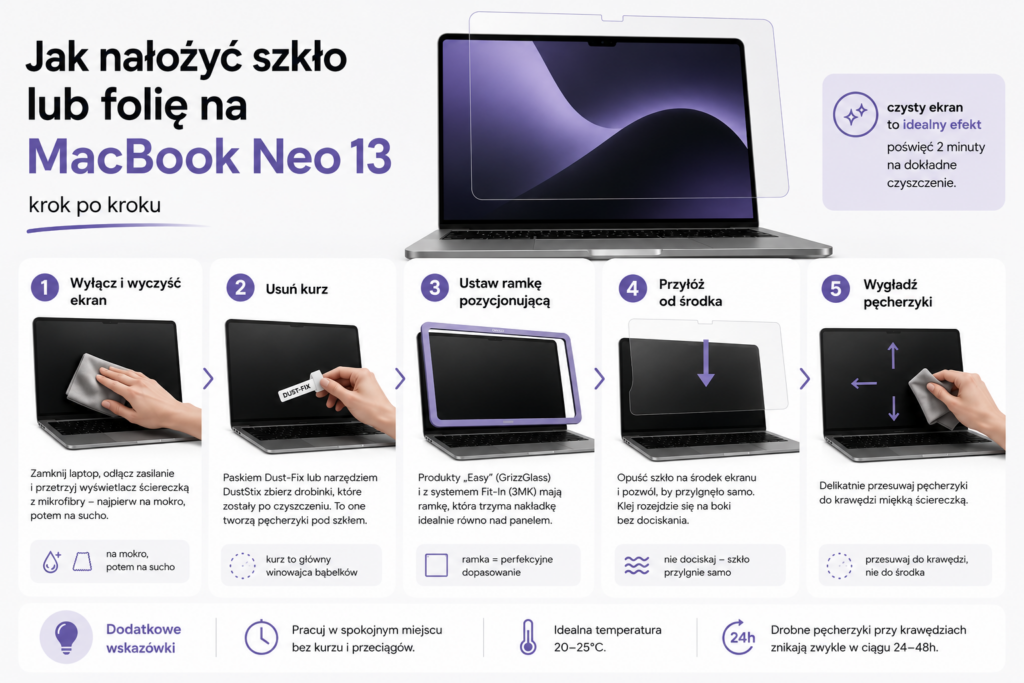
    Jak zamontować folię na ekran multimedialny — krok po kroku

    Montaż folii ochronnej na ekran samochodu jest prostszy niż aplikacja folii na smartfonie. Dedykowane wykrojniki laserowe eliminują najtrudniejszy etap — przycinanie. Oto instrukcja w pięciu krokach:

    1. Turn off the engine and wait — the screen should be at room temperature. A warm car display causes air bubbles under the film.
    2. Clean the multimedia screen — use the cloth from the kit and cleaning solution. Remove any dust — it will be visible under the film.
    3. Remove the protective layer — carefully peel the film from the backing, holding it by the edges. Do not touch the adhesive side.
    4. Apply from the top edge — align the film with the top edge of the screen and slowly lower it, smoothing with a squeegee from the center to the sides.
    5. Remove bubbles — gently push any remaining air bubbles with the squeegee towards the nearest edge of the screen.

    Note: Do not use alcohol-based cleaners on car screens — they may damage the anti-reflective coating of the factory display. Only use products intended for LCD/OLED screens.

    How to take care of the protective film on the car screen?

    After installing the film on the multimedia screen, it is worth following a few rules that will extend its lifespan. Proper care of the film on the car display ensures that it retains its protective properties for a full 2–3 years.

    • Cleaning — use a soft microfiber cloth. Avoid paper towels, which can scratch the surface of the protective film on the screen.
    • Preparations — use only products for LCD/OLED screens, free of alcohol and ammonia. Available in every electronics store.
    • Sunshade — when parking in the sun, use a sunshade for the windshield. This protects both the film on the car screen and the entire interior from overheating.
    • Nails and rings — the film on the multimedia screen protects against scratches, but sharp edges of jewelry can damage it with overly aggressive handling.

    For which cars are multimedia screen films available?

    Seria CarDisplay Protection obejmuje dedykowane folie ochronne na ekrany multimedialne do ponad 6 000 modeli aut. W ofercie homescreen.pl znajdziesz folie do samochodów następujących marek:

    If you can’t find your model, check the category films for other cars — we regularly add new cutouts.

    Summary — the best film for multimedia screen 2026

    The film for the multimedia screen in the car is a cheap and effective way to protect one of the most expensive elements of the interior. In our ranking, the best option turned out to be the GrizzGlass CarDisplay Protection series — available in ceramic and matte variants, with precise laser cutting and a mounting kit included.

    For drivers who value image quality, we recommend the ceramic film for the multimedia screen (from 109.99 PLN). If comfort while driving on sunny days is a priority — the matte film for the car screen with an anti-reflective filter will be a better choice.

    Order by 12:00 PM, and the shipment will be sent the next business day.

    Check the full offer of protective films for car screens at homescreen.pl →

    FAQ — frequently asked questions

    Does the film for the multimedia screen affect touch functionality?

    No. GrizzGlass CarDisplay Protection films maintain 100% touch screen responsiveness. Both the ceramic and matte variants are thin enough not to interfere with touch sensitivity or the operation of multi-touch gestures in car navigation systems.

    How long does a car screen protective film last?

    The car display film lasts on average 2–3 years with normal use. The lifespan depends on conditions — frequent temperature changes and intensive use of the multimedia screen can shorten this period. Replacing the protective film on the screen is simple and does not require a visit to a service center.

    Can I install the film on the car screen myself?

    Yes. All GrizzGlass CarDisplay Protection films come with a mounting kit (cloth, squeegee, cleaning solution). Installing the film on the multimedia screen takes 5–10 minutes. The dedicated laser cut eliminates the need for trimming — just apply and smooth it out.

    Ceramic or matte film — which is better for the car screen?

    The ceramic film for the multimedia screen maintains the original image quality and is better for OLED/AMOLED screens in premium cars. The matte film for the car screen reduces glare and fingerprints — it works well for driving on sunny days. Both protect the display equally effectively against scratches.

    Is the film on the car screen legal?

    Yes. Protective films for multimedia screens are not subject to any legal restrictions, unlike window tinting. You can freely install a film on the car display without worrying about a fine or problems with the technical inspection.

    How much does a multimedia screen film cost?

    GrizzGlass CarDisplay Protection films cost from 109.99 PLN to 199.99 PLN depending on the car model and screen size. This is a fraction of the cost of replacing a scratched car display at a service, which can reach 3,000–8,000 PLN.

  • Multimedia Screen Film — Ranking of the Best Films 2026

    Multimedia Screen Film — Ranking of the Best Films 2026

    The best multimedia screen film in a car is GrizzGlass CarDisplay Protection in ceramic version (from 109.99 PLN) — it protects the display from scratches, maintains full touch responsiveness, and does not change the colors of the image. For drivers who are bothered by sun glare, the matte version with an anti-reflective filter will be better. In the ranking, we included films for car screens dedicated to specific models with precise laser cutting.

    Multimedia screens in modern cars have increasingly larger diagonals — from 9 to even 17 inches. At the same time, they are exposed to scratches from rings, nails, and keys. Replacing a damaged display at an authorized service center costs between 3,000 and 8,000 PLN.

    A protective film for the screen for a fraction of that amount solves the problem once every few years. In this article, we compare the best car screen films available in 2026, test the differences between the ceramic and matte variants, and suggest which film for the car display will work best in your vehicle.

    Why is it worth protecting the multimedia screen in the car?

    Car displays operate in much harsher conditions than smartphone screens. They are exposed to large temperature fluctuations — from frost in winter to over 60°C in summer in the sun. Additionally, you operate them while wearing gloves, with dirty hands after refueling, or with shopping bags in your hands.

    The scratched multimedia screen not only looks worse, but also makes it difficult to read navigation and information from the onboard computer. In premium cars, where the infotainment system costs several thousand zlotys, a protective film on the screen is a cheap insurance policy.

    The film for the car display also provides additional benefits:

    • Reduction of sun glare (matte versions)
    • Protection against fingerprints and greasy stains
    • Maintaining the car’s value when reselling or returning a lease
    • Easier screen cleaning thanks to the oleophobic coating
    • Protection against overheating — ceramic film filters some UV radiation

    Types of protective films for car screens

    Before you move on to the ranking of multimedia screen films, it’s worth understanding the differences between the available types. Each variant has its strengths and will work in different situations — just like with protective films for smartphone screens, the choice depends on your priorities.

    Ceramic film

    Ceramic film is a solution for those who want screen protection without changing the appearance of the display. The ceramic layer effectively absorbs impacts and scratches while maintaining 100% clarity and natural colors. The touch remains just as responsive as on a bare screen.

    Ceramic film for multimedia screens is particularly suitable for cars with high-quality OLED or AMOLED displays, where you care about accurate color reproduction — for example, in navigation systems with satellite view. This is the most commonly chosen type of protective film for screens in new cars.

    Matte film (anti-glare)

    Matte film for screens is a choice for drivers who often drive on sunny days. The surface with an anti-reflective filter eliminates light reflections, ensuring that navigation and multimedia remain readable even in bright sunlight. An additional plus — the matte texture reduces the visibility of fingerprints.

    The disadvantage of matte film is a slight dulling of the image. Colors lose some saturation, and fine details on the map may be minimally less sharp. In practice, the difference is mainly noticeable when directly compared to a bare screen. Matte film on a car screen works best in SUVs with panoramic roofs and convertibles.

    PPF Film (Paint Protection Film)

    PPF film on the screen is a premium solution, mainly known for protecting car paint. It has self-healing properties — minor scratches disappear under the influence of heat. It is thicker than ceramic and matte films, which translates to better mechanical protection of the display.

    It is worth knowing that not every PPF film is suitable for touch screens. Choose only variants designed for car displays that maintain touch responsiveness and do not interfere with sensor operation. PPF film for multimedia screens usually costs more than ceramic variants but offers the highest durability.

    What to pay attention to when choosing a film for a car screen?

    When purchasing protective film for a multimedia screen, check several key parameters. Choosing the right film for a car display ensures that the protection will be effective and will not worsen the comfort of screen operation.

    • Fit to the model — the film for the car screen must be precisely cut for your display. Universal films cut with scissors never fit as well as dedicated laser-cut templates.
    • Thickness — thinner films (0.1–0.15 mm) are less noticeable to the touch, thicker ones (0.2+ mm) provide better mechanical protection.
    • Oleophobic coating — repels grease and makes it easier to clean the multimedia screen from fingerprints.
    • Touch responsiveness — check if the manufacturer guarantees 100% sensitivity of the touch screen.
    • Installation kit — a good protective film for the screen should include a cloth, squeegee, and cleaning solution.
    • Surface hardness — films with a hardness of 9H provide protection against scratches from keys and coins.

    Tip: Before applying the film to the multimedia screen, turn off the engine and wait for the display to cool to room temperature. A warm screen makes precise application difficult and can cause air bubbles.

    Ranking of multimedia screen films 2026

    Below we present the best protective films for car screens available at homescreen.pl in the category car accessories. All products are from the GrizzGlass CarDisplay Protection series — the only brand with dedicated laser-cut templates for over 6,000 car models. Therefore, in our ranking of multimedia screen films, we focus specifically on this series.

    1. GrizzGlass CarDisplay Protection ceramic for Audi Q3 (2025–2026) — 199.99 zł

    Best premium protection — ceramic film dedicated to the new Audi Q3 with a large MMI 10.1 inch multimedia screen. The ceramic layer provides effective protection against scratches without altering the display colors. The flexible material perfectly adheres to the curved panel.

    The GrizzGlass ceramic technology stands out for its lack of optical distortion. The image on the screen looks identical to that without the film — which you will especially appreciate in the MMI system with high-resolution graphics. The higher price results from the larger protective area covering the climate control panel.

    2. GrizzGlass CarDisplay Protection ceramic for VW T-Roc 2 12.9″ (2025–2026) — 129.99 zł

    Best film for car screens from the VAG group — the new second-generation T-Roc features an impressive 12.9-inch display. The ceramic film protects it from scratches during everyday use while maintaining full brightness and color saturation.

    The precise laser cut ensures a perfect fit of the film to the shape of the multimedia screen — without the need for self-trimming. The installation kit included makes application easy even for those without experience in applying protective films.

    3. GrizzGlass CarDisplay Protection matowa do Tesla Model Y Juniper — tylny ekran (2024–2025) — 129,99 zł

    Najlepsza matowa folia na ekran do Tesli — tylny ekran w odświeżonym Model Y Juniper jest szczególnie narażony na zabrudzenia od pasażerów. Matowa powierzchnia skutecznie redukuje odblaski i odciski palców, co docenią zwłaszcza dzieci korzystające z ekranu multimedialnego na tylnej kanapie.

    Tesla to samochód, w którym wyświetlacz pełni rolę centrum sterowania — od klimatyzacji po otwieranie bagażnika. Folia ochronna na ekran jest tu absolutną koniecznością. GrizzGlass oferuje folie zarówno na przedni, jak i tylny wyświetlacz Tesli we wszystkich generacjach.

    4. GrizzGlass CarDisplay Protection ceramiczna do BMW 7 G11/G12 10,25″ (2015–2023) — 119,99 zł

    Folia ceramiczna dedykowana do ekranu iDrive w BMW serii 7. Format 10,25 cala to jeden z najpopularniejszych rozmiarów wyświetlaczy samochodowych w autach BMW — ta sama folia na ekran multimedialny pasuje do wielu modeli z systemem iDrive 7. Ceramiczny materiał nie wpływa na działanie gestów i dotyku wielopunktowego.

    BMW serii 7 to samochód z segmentu premium, w którym zarysowany ekran obniża wartość auta przy odsprzedaży. Folia ochronna na ekran za 119,99 zł to minimalna inwestycja w porównaniu z wymianą wyświetlacza za kilka tysięcy złotych w autoryzowanym serwisie.

    5. GrizzGlass CarDisplay Protection matowa do Skoda Scala 9,2″ Amundsen (2019–2023) — 109,99 zł

    Matowa folia na ekran systemu Amundsen 9,2 cala w Skodzie Scala — jedna z najtańszych folii w rankingu. Antyodblaskowa powierzchnia sprawia, że nawigacja jest czytelna nawet przy ostrym słońcu wpadającym przez przednią szybę. To świetna folia na ekran samochodu dla kierowców, którzy dużo jeżdżą w trasę.

    Skoda to marka, w której ekrany multimedialne Columbus i Amundsen zyskały uznanie za intuicyjność. Matowa folia na wyświetlacz samochodowy nie zmienia sposobu obsługi — dotyk działa identycznie jak na gołym ekranie. Montaż zajmuje dosłownie kilka minut dzięki precyzyjnemu dopasowaniu.

    6. GrizzGlass CarDisplay Protection matowa do radia Android 2DIN 7″ — 109,99 zł

    Jeśli wymieniłeś fabryczne radio na stację Android, ta folia ochronna na ekran jest dla Ciebie. Uniwersalny rozmiar 7 cali pasuje do popularnych modeli radii 2DIN montowanych w Fordach, Volkswagenach, Skodach, Seatach i Oplach. Matowa powierzchnia chroni ekran multimedialny i redukuje odblaski.

    Radio Android to popularna modernizacja starszych aut — dodaje nawigację Google Maps, Android Auto i multimedia. Ekran dotykowy w takim radiu jest jednak podatny na zarysowania, bo nie ma fabrycznej ochrony, jaką stosują producenci OEM. Folia na wyświetlacz samochodowy rozwiązuje ten problem skutecznie i tanio.

    Comparison of multimedia screen films — summary table

    ModelType of filmScreen sizeCarPrice
    CarDisplay ProtectionCeramic10.1″Audi Q3 (2025–2026)199.99 zł
    CarDisplay ProtectionCeramic12.9″VW T-Roc 2 (2025–2026)129.99 zł
    CarDisplay ProtectionMatteRear screenTesla Model Y Juniper129.99 zł
    CarDisplay ProtectionCeramic10.25″BMW 7 G11/G12119.99 zł
    CarDisplay ProtectionMatte9.2″Skoda Scala Amundsen109.99 zł
    CarDisplay ProtectionMatte7″ 2DINAndroid Radio (universal)109.99 zł

    Ceramic or matte — which film to choose for your car screen?

    The choice between ceramic and matte film depends on your priorities. Both versions of GrizzGlass CarDisplay Protection protect the multimedia screen equally effectively — the difference lies in the finish of the protective film surface.

    CechaFolia ceramicznaFolia matowa
    Przejrzystość obrazu✅ 100% — brak zniekształceńLekkie zmatowienie
    Redukcja odblaskówStandardowa✅ Antyrefleksyjna
    Odciski palcówWidoczne (powłoka oleofobowa pomaga)✅ Minimalne
    Wierność kolorów✅ Bez zmianLekkie stonowanie
    CzyszczenieŁatwe✅ Bardzo łatwe
    Idealna dlaEkranów OLED/AMOLED, aut premiumJazdy w słońcu, rodzin z dziećmi

    Folia ceramiczna na ekran multimedialny — wybierz, jeśli zależy Ci na najlepszej jakości obrazu. Sprawdzi się w autach z ekranami o żywych kolorach, takich jak nowe Audi, Mercedes czy BMW z wyświetlaczami OLED. To również lepszy wybór, jeśli często korzystasz z kamery cofania — obraz pozostaje krystalicznie ostry.

    Folia matowa na ekran samochodu — wybierz, jeśli dużo jeździsz w trasę i słońce Ci przeszkadza. Idealna do Tesli (duże ekrany blisko szyb), SUV-ów z panoramicznym dachem i aut używanych przez rodziny z dziećmi. Matowa powierzchnia jest też łatwiejsza w utrzymaniu czystości na co dzień.

    Jak zamontować folię na ekran multimedialny — krok po kroku

    Montaż folii ochronnej na ekran samochodu jest prostszy niż aplikacja folii na smartfonie. Dedykowane wykrojniki laserowe eliminują najtrudniejszy etap — przycinanie. Oto instrukcja w pięciu krokach:

    1. Turn off the engine and wait — the screen should be at room temperature. A warm car display causes air bubbles under the film.
    2. Clean the multimedia screen — use the cloth from the kit and cleaning solution. Remove every speck of dust — it will be visible under the film.
    3. Remove the protective layer — carefully peel the film from the backing, holding it by the edges. Do not touch the adhesive side.
    4. Apply from the top edge — align the film with the top edge of the screen and slowly lower it, smoothing it with a squeegee from the center to the sides.
    5. Remove bubbles — gently push out any remaining air bubbles with the squeegee towards the nearest edge of the screen.

    Note: Do not use alcohol-based cleaners on car screens — they can damage the anti-reflective coating of the factory display. Only use products designed for LCD/OLED screens.

    How to take care of the protective film on the car screen?

    After installing the film on the multimedia screen, it is worth following a few rules that will extend its lifespan. Proper care of the film on the car display ensures that it retains its protective properties for a full 2–3 years.

    • Cleaning — use a soft microfiber cloth. Avoid paper towels, which can scratch the surface of the protective film on the screen.
    • Products — use only LCD/OLED screen cleaners, without alcohol and ammonia. Available at any electronics store.
    • Sunshade — when parking in the sun, use a sunshade for the windshield. This protects both the film on the car screen and the entire interior from overheating.
    • Nails and rings — the film on the multimedia screen protects against scratches, but sharp edges of jewelry can damage it with too aggressive handling.

    For which cars are multimedia screen films available?

    Seria CarDisplay Protection obejmuje dedykowane folie ochronne na ekrany multimedialne do ponad 6 000 modeli aut. W ofercie homescreen.pl znajdziesz folie do samochodów następujących marek:

    If you can’t find your model, check the category films for other cars — we regularly add new cuts.

    Summary — the best film for multimedia screen 2026

    The film for the multimedia screen in the car is a cheap and effective way to protect one of the most expensive elements of the interior. In our ranking, the best option turned out to be the GrizzGlass CarDisplay Protection series — available in ceramic and matte variants, with precise laser cutting and a mounting kit included.

    For drivers who value image quality, we recommend the ceramic film for the multimedia screen (from 109.99 PLN). If comfort while driving on sunny days is a priority — the matte film for the car screen with an anti-reflective filter will be a better choice.

    Order by 12:00 PM, and the shipment will be sent the next business day.

    Check the full offer of protective films for car screens at homescreen.pl →

    FAQ — frequently asked questions

    Does the film for the multimedia screen affect touch functionality?

    No. GrizzGlass CarDisplay Protection films maintain 100% touch screen responsiveness. Both the ceramic and matte variants are thin enough not to interfere with touch sensitivity or multi-touch gestures in car navigation systems.

    How long does a car screen protective film last?

    The film for the car display lasts on average 2–3 years with normal use. The lifespan depends on conditions — frequent temperature changes and intensive use of the multimedia screen can shorten this period. Replacing the protective film on the screen is simple and does not require a service visit.

    Can I install the film on the car screen myself?

    Yes. All GrizzGlass CarDisplay Protection films come with a mounting kit (cloth, squeegee, cleaning solution). Installing the film on the multimedia screen takes 5–10 minutes. The dedicated laser cut eliminates the need for trimming — just apply and smooth it out.

    Ceramic or matte film — which is better for a car screen?

    Ceramic film for the multimedia screen maintains the original image quality and is better for OLED/AMOLED screens in premium cars. Matte film for the car screen reduces glare and fingerprints — it works well for driving on sunny days. Both protect the display equally effectively against scratches.

    Is the film on the car screen legal?

    Yes. Protective films for multimedia screens are not subject to any legal restrictions, unlike window tinting. You can freely install a film on the car display without worrying about fines or issues with the technical inspection.

    How much does a multimedia screen film cost?

    GrizzGlass CarDisplay Protection films cost from 109.99 PLN to 199.99 PLN depending on the car model and screen size. This is a fraction of the cost of replacing a scratched car display at a service center, which can reach 3,000–8,000 PLN.

  • Top 10 GaN chargers – ranking of the best models [2026]

    Top 10 GaN chargers – ranking of the best models [2026]

    The best GaN charger in our store is the Tech-Protect NC240W-GAN (395 zł) with a power of 240 W and four ports, which can charge a laptop, tablet, and two smartphones simultaneously. If you’re looking for something cheaper, 3MK Hyper Charger 33W for 49.90 zł is a great everyday choice.

    The GaN technology (gallium nitride) has revolutionized the charger market. Devices are smaller, lighter, and more efficient than traditional silicon chargers. In this ranking of GaN chargers, we have gathered the 10 best models available at homescreen.pl.

    You will find premium models for over 300 zł and budget options below 60 zł. Each of them has been evaluated in terms of power, ports, charging protocols, and value for money. We also took into account the opinions of our customers and the experiences of the homescreen.pl team from daily use of these chargers.

    What is a GaN charger and why is it worth buying?

    A GaN charger is a wall charger that uses gallium nitride transistors instead of traditional silicon. This difference in material translates into three key advantages:

    • Smaller sizes – a 65 W GaN charger can be the size of a traditional 18 W charger
    • Niższa temperatura pracy – gallium nitride better dissipates heat, which extends lifespan
    • Wyższa sprawność energetyczna – less energy is lost as heat

    In practice, this means you can have one compact charger instead of three different power supplies for your phone, tablet, and laptop. GaN chargers support the USB Power Delivery (USB PD) standard, which is a universal fast charging protocol supported by Apple, Samsung, Xiaomi, and most other manufacturers.

    Tip: If your smartphone supports 25 W charging, a 45 W or 65 W GaN charger will be a great choice. You will charge your phone at full speed, and if needed, you can also connect a tablet or laptop.

    Check the full offer of network chargers at homescreen.pl – you will find all GaN models from our ranking there.

    What to pay attention to when choosing a GaN charger?

    Before purchasing, it is worth analyzing a few key parameters. Here are the most important criteria for choosing a GaN charger.

    Charging power (W)

    Power expressed in watts (W) determines how quickly the charger will replenish the battery. Approximate division:

    PowerApplication
    25–33 WSmartphone (one port)
    45–65 WSmartphone + tablet or ultrabook
    100–140 WLaptop + smartphone simultaneously
    200–240 WCharging station for the whole family

    Number and type of ports

    The more ports, the more devices you can charge at the same time. However, remember that the power is divided among the ports. A 140 W charger with four ports will not provide 140 W to each of them. Manufacturers provide exact power distributions in the specifications that we discuss for each model below. To fully utilize fast charging, you also need a good USB-C cable that supports the appropriate power.

    Supported protocols

    Key charging protocols:

    • USB Power Delivery (PD) – universal standard supported by Apple, Samsung, Google
    • Quick Charge (QC) – Qualcomm standard, popular in smartphones with Snapdragon processors
    • PPS (Programmable Power Supply) – required by Samsung for full charging speed
    • Super Fast Charging (SFC) – Samsung’s standard for 25 W and 45 W charging

    Kompaktowość i waga

    One of the main advantages of GaN chargers. Compare the dimensions of individual models, as differences can be significant even at the same power.

    Top 10 GaN chargers – ranking 2026

    Our ranking of GaN chargers is arranged from the most expensive premium models to the most budget-friendly options. Each charger is available in our store homescreen.pl.

    1. Tech-Protect NC240W-GAN – 240 W power for demanding users (395 zł)

    Highest power in the ranking

    Tech-Protect NC240W-GAN is the absolute top of our ranking. The power of 240 W distributed across four ports (3x USB-C + 1x USB-A) is impressive. The main USB-C1 port delivers up to 140 W, which is enough to charge a MacBook Pro 16″. The second USB-C2 port offers 100 W, while the other two provide 65 W and 60 W.

    The biggest advantage? You can simultaneously charge a laptop, tablet, and two smartphones without noticeable speed drop. Support for USB PD, Quick Charge 3.0, and Super Charge ensures compatibility with virtually any device.

    • Power: 240 W
    • Ports: 3x USB-C + 1x USB-A
    • Protocols: PD 3.1, QC 3.0, Super Charge
    • Dimensions: 127.4 x 65 x 36 mm

    2. Mophie GaN Speedport 120W – premium from Mophie (339 zł)

    Mophie GaN Speedport 120W is a premium GaN charger for Apple brand fans. The Mophie brand is known for accessories for the Apple ecosystem. The charger offers 120 W of power distributed across 4 ports (3x USB-C + 1x USB-A).

    A single USB-C port delivers up to 100 W, which is sufficient for fast charging a MacBook Pro. The intelligent Power Delivery technology automatically adjusts the current to each connected device. The elegant white casing and compact dimensions are additional advantages.

    • Power: 120 W
    • Ports: 3x USB-C + 1x USB-A
    • Protocols: USB PD
    • Color: white

    3. 4smarts GaN Flex Pro 140W – the richest set (249 zł)

    4smarts GaN Flex Pro 140W stands out with a fantastic set in the box. In addition to the fast GaN 140 W charger with three USB-C ports, you will receive a power cable with a Euro plug, an 8-in-1 USB-C hub, and a transport case.

    The main port supports PD 3.1 with a power of up to 140 W (28V/5A). This is one of the latest standards, sufficient for charging even 16-inch laptops. Support for QC 4+, PPS, AFC, SCP, and FCP means compatibility with practically every smartphone on the market.

    • Power: 140 W
    • Ports: 3x USB-C
    • Protocols: PD 3.1, QC 4+, PPS, AFC, SCP, FCP
    • Dimensions: 18 x 9.5 x 3.5 cm
    • Included: 8-in-1 USB-C hub, power cable, case

    4. Tech-Protect NC140W-GAN – great power-to-price ratio (199 zł)

    Tech-Protect NC140W-GAN is a GaN charger with a power of 140 W and four ports for 199 zł. It is one of the best offers in the mid-premium category. The main USB-C1 port provides 140 W, USB-C2 offers 100 W, and the other two ports provide 30 W each.

    This power distribution allows you to charge a laptop on the main port while charging three other devices on the remaining ports. Dimensions of 115 x 62 x 30 mm strike a reasonable compromise between compactness and the number of ports.

    • Power: 140 W
    • Ports: 3x USB-C + 1x USB-A
    • Protocols: PD, QC 3.0
    • Wymiary: 115 x 62 x 30 mm

    Nasz wybór w kategorii stosunek jakości do ceny: Tech-Protect NC140W-GAN oferuje 140 W i 4 porty za 199 zł. Trudno znaleźć lepszą ofertę w tym przedziale cenowym.

    5. Tech-Protect NCA65W-GAN – złoty środek (75 zł)

    Tech-Protect NCA65W-GAN to według nas najlepsza ładowarka GaN w przedziale 50–100 zł. Za 75 zł dostajesz 65 W mocy, trzy porty (2x USB-C + USB-A) i kabel USB-C w zestawie.

    Moc 65 W wystarczy do szybkiego ładowania smartfona, tabletu, a nawet lekkich laptopów typu ultrabook. Przy jednoczesnym użyciu dwóch portów rozkład mocy to 45 W + 20 W. Wymiary 89,1 x 43,7 x 31,7 mm pozwalają bez problemu schować ją do kieszeni plecaka.

    • Moc: 65 W
    • Porty: 2x USB-C + 1x USB-A
    • Protokoły: PD, QC 3.0
    • Wymiary: 89,1 x 43,7 x 31,7 mm
    • W zestawie: kabel USB-C 100 cm

    6. UGREEN X524 45W – kompaktowa moc (59,90 zł)

    UGREEN X524 to jednoportowa ładowarka GaN z mocą 45 W. Idealna, jeśli ładujesz głównie jeden smartfon lub tablet. Obsługuje USB PD i Samsung Super Fast Charging 2.0, więc każdy smartfon Samsunga obsługujący ładowanie 45 W (np. Galaxy S25 Ultra) wykorzysta jej pełny potencjał.

    The fire-resistant polycarbonate (PC) housing ensures safety. Compact dimensions of about 65 x 36 x 38 mm make it one of the smallest 45 W chargers on the market.

    • Power: 45 W
    • Ports: 1x USB-C
    • Protocols: PD, SFC 2.0
    • Dimensions: approx. 65 x 36 x 38 mm

    7. Tech-Protect NCA45W-GAN – budget duo with cable (55 PLN)

    Tech-Protect NCA45W-GAN for 55 PLN is not only a 45 W GaN charger with two ports (USB-C + USB-A), but also comes with a USB-C cable. It’s a ready-to-use charging set: just take it out of the box and plug it in.

    USB-C port offers up to 45 W (PD 3.0), and USB-A up to 18 W (QC 3.0). Weighing only 80 g and measuring 80 x 42 x 29 mm makes it a great travel option. Take it on your trip instead of two separate chargers.

    • Power: 45 W
    • Ports: 1x USB-C + 1x USB-A
    • Protocols: PD 3.0, QC 3.0
    • Dimensions: 80 x 42 x 29 mm
    • Included: 100 cm USB-C cable

    8. Bizon Charger VT-36B 45W – minimalism at a good price (50 zł)

    Bizon Charger VT-36B is an interesting GaN charger for 50 PLN. Two USB-C ports, 45 W power, and third-generation GaN technology (GaN3). The manufacturer promises to charge a smartphone to 50% in just 30 minutes.

    The power distribution with both active ports is 25 W + 20 W, so you can charge two smartphones simultaneously. The white casing and eco-friendly kraft paper packaging are a nice touch for environmentally conscious users.

    • Power: 45 W
    • Ports: 2x USB-C
    • Protocols: PD, QC 4.0, SFC 2.0
    • Technology: GaN3 (third generation)

    9. UGREEN X517 25W – the cheapest option with a cable (49.90 PLN)

    UGREEN X517 is the simplest GaN charger in the ranking: one USB-C port, 25 W of power, and a 1 m USB-C cable included. If you are charging only a smartphone and do not need more ports, this charger will do its job perfectly.

    GaNInfinity technology and the Thermal Guard system ensure safe operation without overheating. It supports USB PD and Samsung Super Fast Charging 25 W, so you can charge the Galaxy S25, S26, and other Samsung models at full speed.

    • Power: 25 W
    • Ports: 1x USB-C
    • Protocols: USB PD, Samsung SFC 25 W
    • Included: 1 m USB-C cable

    10. 3MK Hyper Charger 33W – budget king of protocols (49.90 PLN)

    3MK Hyper Charger PD 33W closes our ranking, but it is by no means the weakest link. For 49.90 PLN, you get a GaN charger with an impressive list of protocols: QC 4+, PPS, AFC, FCP, and SCP. This means full compatibility with Samsung, Huawei, Xiaomi, and Honor phones.

    Two ports (USB-C + USB-A) and a power of 33 W are sufficient for fast charging of one smartphone. Overheating, overload, and surge protections ensure the safety of your devices.

    • Power: 33 W
    • Ports: 1x USB-C + 1x USB-A
    • Protocols: PD, QC 4+, PPS, AFC, FCP, SCP
    • Protections: overheating, overload, surge

    Comparison of GaN chargers – summary table

    The table below compares the key parameters of all models. GaN technology allows for significant differences in power and sizes while maintaining compact dimensions.

    Pos.ModelMocPortyProtokołyKabelCena
    1.Tech-Protect NC240W-GAN240 W3x USB-C + USB-APD 3.1, QC 3.0395 zł
    2.Mophie GaN Speedport120 W3x USB-C + USB-APD339 zł
    3.4smarts GaN Flex Pro140 W3x USB-CPD 3.1, QC 4+, PPS249 zł
    4.Tech-Protect NC140W-GAN140 W3x USB-C + USB-APD, QC 3.0199 zł
    5.Tech-Protect NCA65W-GAN65 W2x USB-C + USB-APD, QC 3.075 zł
    6.UGREEN X52445 W1x USB-CPD, SFC 2.059,90 zł
    7.Tech-Protect NCA45W-GAN45 WUSB-C + USB-APD 3.0, QC 3.055 zł
    8.Bizon Charger VT-36B45 W2x USB-CPD, QC 4.0, SFC 2.050 zł
    9.UGREEN X51725 W1x USB-CPD, SFC 25 W49,90 zł
    10.3MK Hyper Charger33 WUSB-C + USB-APD, QC 4+, PPS49,90 zł

    Which GaN charger to choose? Recommendations based on needs

    The choice of a GaN charger depends on your needs and budget. Here are our specific recommendations.

    Are you charging a laptop and several devices at the same time? Choose Tech-Protect NC240W-GAN (395 zł) or Tech-Protect NC140W-GAN (199 zł). Both have four ports and enough power to charge a laptop via USB-C.

    Looking for a universal charger for everyday use? Tech-Protect NCA65W-GAN (75 zł) is the golden mean, a fast GaN charger with three ports and a cable included. You can charge a smartphone, tablet, or even a lightweight ultrabook.

    Do you have one smartphone and are looking for the cheapest option? UGREEN X517 for 49.90 zł with a cable included or 3MK Hyper Charger 33W for the same price, but with broader protocol compatibility.

    Do you care about aesthetics and a premium brand? Mophie GaN Speedport 120W (339 zł) in an elegant white casing or 4smarts GaN Flex Pro 140W (249 zł) with an 8-in-1 USB-C hub included.

    Are you charging a Samsung Galaxy with 45 W support? UGREEN X524 (59.90 zł) or Bizon Charger VT-36B (50 zł). Both support Samsung Super Fast Charging 2.0.

    If you are also looking for MagSafe accessories for iPhone or smartphone holders and stands, check out our other categories.

    Summary – which GaN charger wins?

    GaN network chargers are the future of fast charging, and our GaN charger ranking will help you choose the best model. They are smaller, cooler, and more efficient than traditional silicon chargers. Our ranking includes models ranging from 49.90 PLN to 395 PLN, so everyone will find something suited to their needs.

    Three key takeaways from the ranking:

    1. Best premium: Tech-Protect NC240W-GAN (240 W, 4 ports, 395 PLN) for those who charge everything at once
    2. Best value for money: Tech-Protect NC140W-GAN (140 W, 4 ports, 199 PLN) a strong charger without overpaying
    3. Best budget: Tech-Protect NCA65W-GAN (65 W, 3 ports, 75 PLN) a golden mean with a cable included

    Check out the best network chargers at homescreen.pl and choose the ideal model for your needs.

    FAQ – frequently asked questions about GaN chargers

    What is a GaN charger?

    Dobra ładowarka GaN kosztuje zazwyczaj od 150 do 300 zł, w zależności od mocy i dodatkowych funkcji. Warto zainwestować w model od renomowanego producenta, aby zapewnić sobie bezpieczeństwo i wysoką jakość ładowania.

    Good GaN chargers start at around 50 PLN for models 25–45 W. For 75 PLN, you can buy a solid 65 W charger with three ports. Premium models 120–240 W cost 199–395 PLN. In our store, you will find every GaN wall charger from our ranking and many other models.

    Does a GaN charger work with an iPhone?

    Yes. All GaN chargers with a USB-C port and USB Power Delivery support are compatible with iPhones (from iPhone 8 onwards). iPhone 15, 16, and newer have a USB-C port, so you can connect them directly. Older models with Lightning require a USB-C to Lightning cable.

  • Top 10 GaN chargers – ranking of the best models [2026]

    Top 10 GaN chargers – ranking of the best models [2026]

    The best GaN charger in our store is the Tech-Protect NC240W-GAN (395 zł) with a power of 240 W and four ports, which can charge a laptop, tablet, and two smartphones simultaneously. If you’re looking for something cheaper, 3MK Hyper Charger 33W for 49.90 zł is a great everyday choice.

    GaN technology (gallium nitride) has revolutionized the charger market. Devices are smaller, lighter, and more efficient than traditional silicon chargers. In this ranking of GaN chargers, we have gathered the 10 best models available at homescreen.pl.

    You will find premium models for over 300 zł and budget options below 60 zł. Each of them has been evaluated in terms of power, ports, charging protocols, and value for money. We also took into account the opinions of our customers and the experiences of the homescreen.pl team from everyday use of these chargers.

    What is a GaN charger and why is it worth buying?

    A GaN charger is a wall charger that uses gallium nitride transistors instead of traditional silicon. This difference in material translates into three key advantages:

    • Smaller sizes – a 65 W GaN charger can be the size of a traditional 18 W charger
    • Niższa temperatura pracy – azotek galu lepiej odprowadza ciepło, co wydłuża żywotność
    • Wyższa sprawność energetyczna – mniej energii traci się w postaci ciepła

    W praktyce oznacza to, że możesz mieć jedną kompaktową ładowarkę zamiast trzech różnych zasilaczy do telefonu, tabletu i laptopa. Ładowarki GaN obsługują standard USB Power Delivery (USB PD), czyli uniwersalny protokół szybkiego ładowania obsługiwany przez Apple, Samsung, Xiaomi i większość innych producentów.

    Porada: Jeśli Twój smartfon obsługuje ładowanie 25 W, ładowarka GaN 45 W lub 65 W będzie świetnym wyborem. Naładujesz telefon z pełną prędkością, a w razie potrzeby podłączysz też tablet czy laptopa.

    Sprawdź pełną ofertę ładowarek sieciowych w homescreen.pl – znajdziesz tam wszystkie modele GaN z naszego rankingu.

    Na co zwrócić uwagę przy wyborze ładowarki GaN?

    Przed zakupem warto przeanalizować kilka kluczowych parametrów. Oto najważniejsze kryteria wyboru ładowarki GaN.

    Moc ładowania (W)

    Moc wyrażana w watach (W) określa, jak szybko ładowarka uzupełni baterię. Orientacyjny podział:

    PowerApplication
    25–33 WSmartphone (one port)
    45–65 WSmartphone + tablet or ultrabook
    100–140 WLaptop + smartphone simultaneously
    200–240 WCharging station for the whole family

    Number and type of ports

    The more ports, the more devices you can charge simultaneously. However, remember that the power is divided among the ports. A 140 W charger with four ports will not provide 140 W to each of them. Manufacturers provide exact power distributions in the specifications, which we discuss for each model below. To fully utilize fast charging, you also need a good USB-C cable that supports the appropriate power.

    Supported protocols

    Key charging protocols:

    • USB Power Delivery (PD) – universal standard supported by Apple, Samsung, Google
    • Quick Charge (QC) – Qualcomm’s standard, popular in smartphones with Snapdragon processors
    • PPS (Programmable Power Supply) – required by Samsung for full charging speed
    • Super Fast Charging (SFC) – Samsung’s standard for 25 W and 45 W charging

    Kompaktowość i waga

    One of the main advantages of GaN chargers. Compare the dimensions of individual models, as differences can be significant even at the same power.

    Top 10 GaN chargers – ranking 2026

    Our ranking of GaN chargers is arranged from the most expensive premium models to the most budget-friendly options. Each charger is available in our store homescreen.pl.

    1. Tech-Protect NC240W-GAN – 240 W power for demanding users (395 zł)

    Highest power in the ranking

    Tech-Protect NC240W-GAN is the absolute leader of our ranking. The power of 240 W distributed across four ports (3x USB-C + 1x USB-A) is impressive. The main USB-C1 port delivers up to 140 W, which is enough to charge a MacBook Pro 16″. The second USB-C2 port offers 100 W, while the other two provide 65 W and 60 W respectively.

    The biggest advantage? You can simultaneously charge a laptop, a tablet, and two smartphones without noticeable speed drop. Support for USB PD, Quick Charge 3.0, and Super Charge ensures compatibility with virtually any device.

    • Power: 240 W
    • Ports: 3x USB-C + 1x USB-A
    • Protocols: PD 3.1, QC 3.0, Super Charge
    • Dimensions: 127.4 x 65 x 36 mm

    2. Mophie GaN Speedport 120W – premium from Mophie (339 zł)

    Mophie GaN Speedport 120W is a premium GaN charger for Apple brand fans. The Mophie brand is known for accessories for the Apple ecosystem. The charger offers 120 W of power distributed across 4 ports (3x USB-C + 1x USB-A).

    A single USB-C port delivers up to 100 W, which is sufficient for fast charging a MacBook Pro. The intelligent Power Delivery technology automatically adjusts the current to each connected device. The elegant white casing and compact dimensions are additional advantages.

    • Power: 120 W
    • Ports: 3x USB-C + 1x USB-A
    • Protocols: USB PD
    • Color: white

    3. 4smarts GaN Flex Pro 140W – the richest set (249 zł)

    4smarts GaN Flex Pro 140W wyróżnia się fantastycznym zestawem w pudełku. Oprócz samej szybkiej ładowarki GaN 140 W z trzema portami USB-C dostaniesz kabel zasilający z eurowtykiem, hub USB-C 8w1 i etui transportowe.

    Główny port obsługuje PD 3.1 z mocą do 140 W (28V/5A). To jeden z najnowszych standardów, wystarczający do ładowania nawet 16-calowych laptopów. Obsługa QC 4+, PPS, AFC, SCP i FCP oznacza kompatybilność z praktycznie każdym smartfonem na rynku.

    • Moc: 140 W
    • Porty: 3x USB-C
    • Protokoły: PD 3.1, QC 4+, PPS, AFC, SCP, FCP
    • Wymiary: 18 x 9,5 x 3,5 cm
    • W zestawie: hub USB-C 8w1, kabel zasilający, etui

    4. Tech-Protect NC140W-GAN – excellent power-to-price ratio (199 zł)

    Tech-Protect NC140W-GAN is a GaN charger with a power of 140 W and four ports for 199 zł. It is one of the best offers in the mid-premium category. The main USB-C1 port provides 140 W, USB-C2 offers 100 W, and the other two ports provide 30 W each.

    This power distribution allows you to charge a laptop on the main port and three other devices on the remaining ports simultaneously. The dimensions of 115 x 62 x 30 mm are a reasonable compromise between compactness and the number of ports.

    • Power: 140 W
    • Ports: 3x USB-C + 1x USB-A
    • Protocols: PD, QC 3.0
    • Wymiary: 115 x 62 x 30 mm

    Nasz wybór w kategorii stosunek jakości do ceny: Tech-Protect NC140W-GAN oferuje 140 W i 4 porty za 199 zł. Trudno znaleźć lepszą ofertę w tym przedziale cenowym.

    5. Tech-Protect NCA65W-GAN – złoty środek (75 zł)

    Tech-Protect NCA65W-GAN to według nas najlepsza ładowarka GaN w przedziale 50–100 zł. Za 75 zł dostajesz 65 W mocy, trzy porty (2x USB-C + USB-A) i kabel USB-C w zestawie.

    Moc 65 W wystarczy do szybkiego ładowania smartfona, tabletu, a nawet lekkich laptopów typu ultrabook. Przy jednoczesnym użyciu dwóch portów rozkład mocy to 45 W + 20 W. Wymiary 89,1 x 43,7 x 31,7 mm pozwalają bez problemu schować ją do kieszeni plecaka.

    • Moc: 65 W
    • Porty: 2x USB-C + 1x USB-A
    • Protokoły: PD, QC 3.0
    • Wymiary: 89,1 x 43,7 x 31,7 mm
    • W zestawie: kabel USB-C 100 cm

    6. UGREEN X524 45W – kompaktowa moc (59,90 zł)

    UGREEN X524 to jednoportowa ładowarka GaN z mocą 45 W. Idealna, jeśli ładujesz głównie jeden smartfon lub tablet. Obsługuje USB PD i Samsung Super Fast Charging 2.0, więc każdy smartfon Samsunga obsługujący ładowanie 45 W (np. Galaxy S25 Ultra) wykorzysta jej pełny potencjał.

    The fire-resistant polycarbonate (PC) housing ensures safety. Compact dimensions of approximately 65 x 36 x 38 mm make it one of the smallest 45 W chargers on the market.

    • Power: 45 W
    • Ports: 1x USB-C
    • Protocols: PD, SFC 2.0
    • Dimensions: approx. 65 x 36 x 38 mm

    7. Tech-Protect NCA45W-GAN – budget duo with cable (55 zł)

    Tech-Protect NCA45W-GAN for 55 zł is not only a 45 W GaN charger with two ports (USB-C + USB-A) but also comes with a USB-C cable included. It’s a ready-to-use charging set: just take it out of the box and connect.

    USB-C port offers up to 45 W (PD 3.0), and USB-A up to 18 W (QC 3.0). Weighing just 80 g and measuring 80 x 42 x 29 mm makes it a great travel option. Take it on your trip instead of two separate chargers.

    • Power: 45 W
    • Ports: 1x USB-C + 1x USB-A
    • Protocols: PD 3.0, QC 3.0
    • Dimensions: 80 x 42 x 29 mm
    • Included: 100 cm USB-C cable

    8. Bizon Charger VT-36B 45W – minimalism at a good price (50 zł)

    Bizon Charger VT-36B is an interesting GaN charger for 50 PLN. Two USB-C ports, 45 W power, and third-generation GaN technology (GaN3). The manufacturer promises to charge a smartphone to 50% in just 30 minutes.

    The power distribution with both active ports is 25 W + 20 W, so you can charge two smartphones simultaneously. The white casing and eco-friendly kraft paper packaging is a nice touch for environmentally conscious users.

    • Power: 45 W
    • Ports: 2x USB-C
    • Protocols: PD, QC 4.0, SFC 2.0
    • Technology: GaN3 (third generation)

    9. UGREEN X517 25W – the cheapest option with a cable (49.90 PLN)

    UGREEN X517 is the simplest GaN charger in the ranking: one USB-C port, 25 W of power, and a 1 m USB-C cable included. If you are charging only a smartphone and do not need more ports, this charger will do its job perfectly.

    GaNInfinity technology and the Thermal Guard system ensure safe operation without overheating. It supports USB PD and Samsung Super Fast Charging 25 W, so you can charge Galaxy S25, S26, and other Samsung models at full speed.

    • Power: 25 W
    • Ports: 1x USB-C
    • Protocols: USB PD, Samsung SFC 25 W
    • Included: 1 m USB-C cable

    10. 3MK Hyper Charger 33W – budget king of protocols (49.90 PLN)

    3MK Hyper Charger PD 33W closes our ranking, but it is by no means the weakest link. For 49.90 PLN, you get a GaN charger with an impressive list of protocols: QC 4+, PPS, AFC, FCP, and SCP. This means full compatibility with Samsung, Huawei, Xiaomi, and Honor phones.

    Two ports (USB-C + USB-A) and a power of 33 W are sufficient for fast charging of one smartphone. Overheating, overload, and surge protections ensure the safety of your devices.

    • Power: 33 W
    • Ports: 1x USB-C + 1x USB-A
    • Protocols: PD, QC 4+, PPS, AFC, FCP, SCP
    • Protections: overheating, overload, surge

    Comparison of GaN chargers – summary table

    The table below compares the key parameters of all models. GaN technology allows for significant differences in power and sizes while maintaining compact dimensions.

    Pos.ModelMocPortyProtokołyKabelCena
    1.Tech-Protect NC240W-GAN240 W3x USB-C + USB-APD 3.1, QC 3.0395 zł
    2.Mophie GaN Speedport120 W3x USB-C + USB-APD339 zł
    3.4smarts GaN Flex Pro140 W3x USB-CPD 3.1, QC 4+, PPS249 zł
    4.Tech-Protect NC140W-GAN140 W3x USB-C + USB-APD, QC 3.0199 zł
    5.Tech-Protect NCA65W-GAN65 W2x USB-C + USB-APD, QC 3.075 zł
    6.UGREEN X52445 W1x USB-CPD, SFC 2.059,90 zł
    7.Tech-Protect NCA45W-GAN45 WUSB-C + USB-APD 3.0, QC 3.055 zł
    8.Bizon Charger VT-36B45 W2x USB-CPD, QC 4.0, SFC 2.050 zł
    9.UGREEN X51725 W1x USB-CPD, SFC 25 W49,90 zł
    10.3MK Hyper Charger33 WUSB-C + USB-APD, QC 4+, PPS49,90 zł

    Which GaN charger to choose? Recommendations based on needs

    The choice of a GaN charger depends on your needs and budget. Here are our specific recommendations.

    Are you charging a laptop and several devices at the same time? Choose Tech-Protect NC240W-GAN (395 zł) or Tech-Protect NC140W-GAN (199 zł). Both have four ports and power sufficient to charge a laptop via USB-C.

    Are you looking for a universal charger for everyday use? Tech-Protect NCA65W-GAN (75 zł) is the golden mean, a fast GaN charger with three ports and a cable included. You can charge your smartphone, tablet, or even a lightweight ultrabook.

    Do you have one smartphone and are looking for the cheapest option? UGREEN X517 for 49.90 zł with a cable included or 3MK Hyper Charger 33W for the same price, but with broader protocol compatibility.

    Do you care about aesthetics and premium brands? Mophie GaN Speedport 120W (339 zł) in an elegant white casing or 4smarts GaN Flex Pro 140W (249 zł) with an 8-in-1 USB-C hub included.

    Are you charging a Samsung Galaxy with 45 W support? UGREEN X524 (59.90 zł) or Bizon Charger VT-36B (50 zł). Both support Samsung Super Fast Charging 2.0.

    If you are also looking for MagSafe accessories for iPhone or smartphone holders and stands, check out our other categories.

    Summary – which GaN charger wins?

    GaN chargers are the future of fast charging, and our GaN charger ranking will help you choose the best model. They are smaller, cooler, and more efficient than traditional silicon chargers. Our ranking includes models from 49.90 PLN to 395 PLN, so everyone will find something suited to their needs.

    Three key takeaways from the ranking:

    1. Best premium: Tech-Protect NC240W-GAN (240 W, 4 ports, 395 PLN) for those who charge everything at once
    2. Best value for money: Tech-Protect NC140W-GAN (140 W, 4 ports, 199 PLN) a strong charger without overpaying
    3. Best budget: Tech-Protect NCA65W-GAN (65 W, 3 ports, 75 PLN) a golden mean with a cable included

    Check out the best wall chargers at homescreen.pl and choose the ideal model for your needs.

    FAQ – frequently asked questions about GaN chargers

    What is a GaN charger?

    Dobra ładowarka GaN kosztuje zazwyczaj od 100 do 300 zł, w zależności od mocy i liczby portów. Warto inwestować w sprawdzone marki, aby zapewnić sobie bezpieczeństwo i wysoką jakość ładowania.

    Good GaN chargers start at around 50 PLN for models 25–45 W. For 75 PLN, you can buy a solid 65 W charger with three ports. Premium models 120–240 W cost 199–395 PLN. In our store, you will find every GaN wall charger from our ranking and many other models.

    Does a GaN charger work with an iPhone?

    Yes. All GaN chargers with a USB-C port and USB Power Delivery support are compatible with iPhones (from iPhone 8 and later). iPhone 15, 16 and newer have a USB-C port, so you can connect them directly. Older models with Lightning require a USB-C to Lightning cable.

  • Vivo X300 Ultra — specifications, price, and release date

    Vivo X300 Ultra — specifications, price, and release date


    Source: Vivo / GSMArena

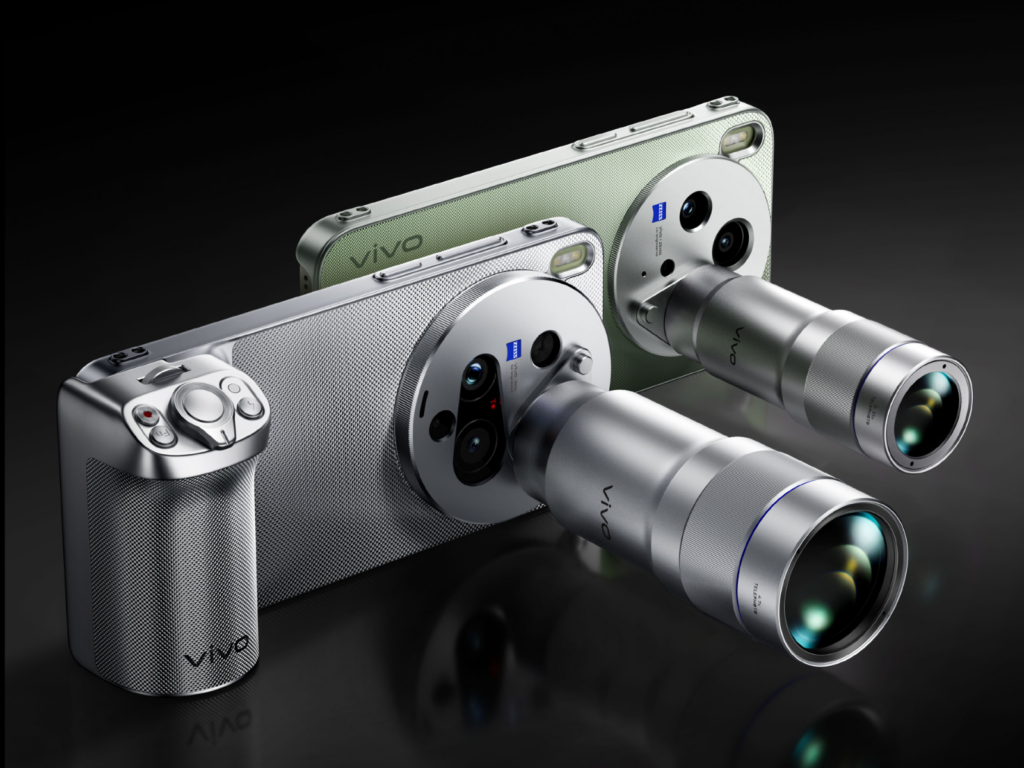
    Vivo X300 Ultra is the first smartphone with an optional ZEISS 400 mm teleconverter, dual 200 MP sensor, and gimbal-level OIS stabilization (CIPA 7.0). Battery up to 7000 mAh, Snapdragon 8 Elite Gen 5, and a 2K 144 Hz display housed in a case only 8.19 mm thick. The launch in China is set for March 30, 2026, with global availability in Q2 2026.

    This is a groundbreaking moment for Vivo — for the first time, the Ultra variant will hit global markets, including Europe. The new flagship Vivo was showcased at MWC 2026 in Barcelona, where the most impressive accessories were the 400 mm teleconverter and a professional video cage created in collaboration with SmallRig.

    Vivo X300 Ultra Specification — Key Parameters

    ParametrVivo X300 Ultra
    Wyświetlacz6,82″ LTPO AMOLED, 2K (1440 x 3168), 144 Hz
    Kalibracja ekranuZEISS Master Color
    Ochrona ekranuArmor Glass
    ProcesorSnapdragon 8 Elite Gen 5 (3 nm)
    RAM12 / 16 GB LPDDR5x
    Pamięć256 GB / 512 GB / 1 TB UFS 4.1
    Aparat główny200 MP Sony LYT-901, 1/1,12″, f/1.85, OIS gimbal, ZEISS T*
    Teleobiektyw 3,7x200 MP Samsung HP0, 1/1,4″, f/2.3, peryskop, ZEISS APO
    Ultraszeroki50 MP Sony LYTIA 818, 1/1,28″, f/2.0, 116°, OIS
    Aparat przedni50 MP, f/2.5, AF
    Sensor wielospektralny5 MP VCS 3. generacji
    Bateria6600 / 7000 mAh (krzem-węgiel)
    Ładowanie przewodowe100 W
    Ładowanie bezprzewodowe40 W + reverse charging
    OdpornośćIP68 / IP69
    SystemAndroid 16 + OriginOS 6
    Wymiary8,19 mm grubości
    Łączność5G, Wi-Fi 7, Bluetooth 5.4, NFC, IR
    Koloryczarny, srebrny, zielony

    Aparat ZEISS — podwójne 200 MP i telekonwerter 400 mm

    Vivo X300 Ultra system aparatów ZEISS — specyfikacja sensorów
    Źródło: Vivo / GSMArena

    The Vivo X300 Ultra camera system is the result of years of collaboration with ZEISS. Three lenses cover a focal length range from 14 mm to 85 mm, and the optional teleconverter extends it to 400 mm — which means 17.4x optical zoom at full 200 MP resolution.

    The main sensor 200 MP Sony LYT-901 (1/1.12″) is the same unit found in the OPPO Find X9 Ultra, but Vivo has used a 35 mm focal length instead of 23 mm — classic for street and portrait photography. OIS stabilization reaches a level of CIPA 7.0, which Vivo describes as «gimbal-like».

    The telephoto lens 200 MP Samsung HP0 (1/1.4″) with a 3.7x periscope and ZEISS APO certification provides native zoom at 85 mm. It is one of the largest telephoto sensors in a smartphone — for comparison, the Samsung Galaxy S25 Ultra has 50 MP in its telephoto lens.

    In addition, Vivo has implemented:

    • ZEISS T coating* — reduction of flares and reflections on the main lens
    • ZEISS APO certification — minimization of chromatic aberration in the telephoto lens
    • 3rd generation VCS multispectral sensor (5 MP) — color correction between lenses
    • 8K recording at 30 fps and 4K at 120 fps in Dolby Vision on all cameras
    • Four-microphone system — professional sound quality in video

    Telekonwerter ZEISS 400 mm — unikalne akcesorium

    Największym wyróżnikiem Vivo X300 Ultra jest opcjonalny telekonwerter ZEISS „Big Gun 400″ — sprzedawany osobno. Montowany magnetycznie do telefonu, dostarcza ogniskową 400 mm (17,4x zoom optyczny) w pełnej rozdzielczości 200 MP. Przycinając obraz z sensora, można osiągnąć 800 mm, a cyfrowo nawet 1600 mm z akceptowalną jakością. Stabilizacja utrzymuje poziom CIPA 4.5 nawet przy ekstremalnym zoomie.

    Porada: Telekonwerter 400 mm to sprzęt dla entuzjastów fotografii przyrodniczej i sportowej. Jeśli interesuje Cię bardziej codzienny zoom dalekiego zasięgu, OPPO Find X9 Ultra oferuje natywny 10x zoom optyczny bez dodatkowych akcesoriów.

    Wyświetlacz 2K z kalibracją ZEISS Master Color

    Vivo X300 Ultra otrzymał 6,82-calowy płaski panel LTPO AMOLED o rozdzielczości 2K (1440 x 3168 pikseli, ~510 ppi) z odświeżaniem do 144 Hz. Wyświetlacz obsługuje Dolby Vision i HDR Vivid.

    Nowością jest ZEISS Master Color — po raz pierwszy w smartfonie to ZEISS, a nie producent telefonu, odpowiada za kalibrację kolorów wyświetlacza. Technologia Ultra XDR poprawia jasność i kontrast w trudnych warunkach oświetleniowych. Ochronę zapewnia Armor Glass.

    Ekran jest płaski — Vivo świadomie zrezygnowało z zakrzywionych krawędzi, co ułatwia użycie folii ochronnych i zmniejsza ryzyko przypadkowych dotknięć.

    Snapdragon 8 Elite Gen 5 — the same chip as in the best flagships

    The heart of the Vivo X300 Ultra is the Snapdragon 8 Elite Gen 5 manufactured using a 3 nm process — the same processor as in the OPPO Find X9 Ultra and the upcoming Samsung Galaxy S27 Ultra. The Oryon V3 Phoenix cores (2x 4.6 GHz + 6x 3.62 GHz) and Adreno 840 graphics provide top market performance.

    In the Geekbench 6 benchmark, the Chinese variant achieved 3722 points in the single-core test and 11,621 in the multi-core test. The LPDDR5x RAM in 12 or 16 GB variants and UFS 4.1 storage up to 1 TB complete the specification. The whole system runs on Android 16 with the OriginOS 6 overlay.

    Battery up to 7000 mAh — in a case 8.19 mm thick

    The specification of the Vivo X300 Ultra in terms of battery impresses in context — a silicon-carbon cell with a capacity of 6600–7000 mAh (the variant with satellite connectivity has a larger battery) is housed in a case only 8.19 mm thick. This is one of the best engineering achievements in 2026.

    Wired charging 100 W will charge the battery in less than 40 minutes. Wireless charging 40 W is slower than the competition (OPPO offers 50 W), but still fast enough for daily use. Vivo X300 Ultra supports USB PD, PPS, QC, and UFCS standards — USB-C cable with USB PD will charge it from any compatible charger.

    Tip: For longer trips, it’s worth taking a power bank with USB PD — with a battery up to 7000 mAh and 100 W charging, a compact 10,000 mAh model is the perfect addition to the set.

    Design — 8.19 mm with IP69 and professional accessories

    Vivo X300 Ultra with ZEISS 400 mm teleconverter — hands-on
    Source: Vivo / GSMArena

    Vivo X300 Ultra is a smartphone designed with photographers in mind. The 8.19 mm thick body is one of the thinnest among flagships with a battery over 6000 mAh. The glass front and back are connected by an aluminum frame.

    The IP68 + IP69 certification provides the highest level of protection — resistance to immersion and water jets under pressure. Stereo speakers with a 0.8 cc chamber and Hi-Res Audio (24-bit/192 kHz) support complete the multimedia specifications.

    Vivo X300 Ultra is available in three colors: black (solid matte), silver, and green (dual-tone with contrasting rear panel finish).

    Professional photographic accessories

    In addition to the 400 mm teleconverter, Vivo has prepared a professional video cage in collaboration with SmallRig (Pro Video Rig Kit):

    • Cage with two Bluetooth handles (shutter + zoom)
    • Adjustable LED lighting
    • Active cooling fan
    • Cold shoe mounts for microphone or light
    • Quick mount system

    Vivo X300 Ultra vs OPPO Find X9 Ultra — comparison of direct rivals

    ParametrVivo X300 UltraOPPO Find X9 Ultra
    ProcesorSnapdragon 8 Elite Gen 5Snapdragon 8 Elite Gen 5
    Wyświetlacz6,82″, 2K, 144 Hz6,82″, QHD+, 144 Hz, 3600 nit
    Aparat główny200 MP, f/1.85, 35 mm200 MP, f/1.5, 23 mm
    Teleobiektyw200 MP peryskop, 3,7x200 MP peryskop 3x + 50 MP 10x
    Maks. zoom optyczny3,7x (17,4x z telekonwerterem)10x natywny
    Ultraszeroki50 MP, 1/1,28″50 MP
    Bateria6600–7000 mAh7050 mAh
    Ładowanie przewodowe100 W100 W
    Ładowanie bezprzewodowe40 W50 W
    Partner fotograficznyZEISSHasselblad
    Grubość8,19 mm~8,7 mm
    Akcesoria fotoklatka wideo + telekonwerter 400 mm

    To najciekawszy pojedynek 2026 roku w segmencie fotograficznych flagowców. OPPO Find X9 Ultra wygrywa natywnym 10x zoomem optycznym bez akcesoriów, jaśniejszym obiektywem f/1.5 i szybszym ładowaniem bezprzewodowym. Vivo X300 Ultra odpowiada ekosystemem ZEISS, cieńszą obudową, większym sensorem teleobiektywu (200 MP vs 50 MP w 10x) i profesjonalnymi akcesoriami wideo.

    Premiera i cena Vivo X300 Ultra

    The premiere of Vivo X300 Ultra in China takes place on March 30, 2026 — sales will start on April 3. Global availability, including in Europe (confirmed markets: Austria, Germany, Hungary), is planned for Q2 2026.

    Estimated prices:

    • China: 6499–8999 CNY (~3650–5050 PLN) depending on the variant
    • Europe (import from HK): approx. 1162–1384 EUR (~5000–5950 PLN)
    • Europe (official, top variant 16/1 TB): approx. 1999 EUR (~8600 PLN)

    The 16 GB / 1 TB variant with satellite connectivity is a premium edition. Standard configurations of 12/256 GB and 12/512 GB will be significantly cheaper.

    Summary

    Vivo X300 Ultra is a flagship created for photographers and video creators. Key features in brief:

    • Dual 200 MP sensors — main (Sony LYT-901, 1/1.12″) and telephoto (Samsung HP0, 1/1.4″), both with ZEISS certification
    • ZEISS 400 mm teleconverter — 17.4x optical zoom at full resolution, sold separately
    • OIS CIPA 7.0 stabilization — similar to a gimbal on the main camera
    • Battery up to 7000 mAh in a body only 8.19 mm thick
    • 8K/30 fps and 4K/120 fps recording Dolby Vision on all cameras
    • Launch on March 30, 2026 — the first globally available Ultra from Vivo

    If you decide to go for this model after the launch, check out smartphone accessories at homescreen.pl — wall chargers, power banks, and USB-C cables will complete the set.

    FAQ — frequently asked questions

    When is the Vivo X300 Ultra launch?

    The launch in China is on March 30, 2026, with sales starting on April 3. Global availability — including in Europe — is planned for Q2 2026 (April–May). This is the first global Ultra from Vivo.

    How much will the Vivo X300 Ultra cost in Europe?

    The official price for the top variant 16 GB / 1 TB is around 1999 EUR (~8600 PLN). Cheaper configurations (12/256 GB) imported from Hong Kong cost about 1162 EUR (~5000 PLN). Final European prices may vary.

    What camera does the Vivo X300 Ultra have?

    Triple ZEISS system: main 200 MP (Sony LYT-901, 1/1.12″, f/1.85), telephoto 200 MP (Samsung HP0, 1/1.4″, periscope 3.7x) and ultra-wide 50 MP (116°). Optional ZEISS 400 mm teleconverter extends zoom to 17.4x optically.

    How does the Vivo X300 Ultra differ from the OPPO Find X9 Ultra?

    Both have Snapdragon 8 Elite Gen 5 and a 200 MP sensor. The key difference: OPPO has native 10x optical zoom without accessories, Vivo offers 3.7x natively, but with a 400 mm teleconverter achieves 17.4x. Vivo has a larger telephoto sensor (200 MP vs 50 MP), OPPO — a brighter main lens (f/1.5 vs f/1.85) and faster wireless charging (50 W vs 40 W).

    Does the Vivo X300 Ultra support wireless charging?

    Yes — 40 W wirelessly and 100 W wired. It supports reverse charging (wired and wireless) and the USB PD, PPS, QC, and UFCS standards.

    Is the Vivo X300 Ultra waterproof?

    Yes — it has IP68 (submersion up to 1.5 m for 30 minutes) and IP69 (resistance to water jets under pressure) certifications. This is the highest level of protection available in smartphones.

  • Piano black in the car — how to protect against scratches?

    Piano black in the car — how to protect against scratches?

    The most effective protection for piano black in a car is the PianoSkin protective film — a precisely cut PPF kit for self-installation, available from 112 PLN. Piano black is a finish that looks elegant until the first touch — the black, glossy plastic scratches from the slightest contact and collects fingerprints like a magnet.

    The problem affects practically every brand — from Volkswagen and Škoda, through Toyota and Kia, to BMW and Tesla. If scratched plastic in your car is your problem, this guide will show you 5 ways to protect and restore piano black elements.

    What is piano black and why does it scratch?

    Piano black (also known as «black piano») is a high-gloss lacquered plastic ABS or PMMA used on decorative elements inside the car. It gets its name from the finish resembling the surface of a piano — deep black with a mirror-like reflection.

    You will most often find it on:

    • Center panel (central console, center tunnel)
    • Door trims and window frames from the inside
    • Gear shift lever housing and the frame of the automatic transmission
    • Multimedia screen frame
    • Air conditioning panels and buttons
    • Dashboard elements

    The problem with piano black arises from the very nature of the material. The glossy surface reveals every, even microscopic, scratch. Hard dust particles act like sandpaper — just wiping the element with a dry cloth covers the surface with a network of fine scratches. Nails, rings, and even the sleeve of a jacket can leave visible marks.

    What’s worse, the darker the surroundings in the cabin, the more clearly the light-reflecting scratches are visible. After a few months of use, a new, elegant panel looks heavily worn.

    How to clean piano black without scratching?

    Improper cleaning causes most scratches on piano black. What to clean piano black with to avoid scratching it? Here is a proven method.

    What not to do:

    • Do not wipe piano black with a dry cloth — you are dragging dust particles across the surface
    • Do not use paper towels or tissues — they have too coarse a texture
    • Do not use alcohol-based, acetone, or solvent-based cleaners
    • Do not rub in circles — it deepens existing scratches

    Proper cleaning step by step:

    1. Blow off loose dust with compressed air or a soft detailing brush
    2. Dampen a clean microfiber cloth (with a minimum weight of 300 GSM) with a pH-neutral cleaner or a dedicated product for piano black
    3. Wipe the surface gently, in one direction — never in circular motions
    4. Dry with a second, dry microfiber cloth, again in one direction

    Tip: Keep a separate microfiber cloth in the glove compartment designated solely for piano black elements. A dirty cloth previously used to clean the dashboard contains particles that will scratch the glossy surface.

    Polishing piano black — a rescue for scratched elements

    Removing scratches from piano black is possible through polishing. If the elements in your car’s interior are already covered with a network of fine scratches — piano black scratches of this type can be effectively renewed. However, this method has its limitations.

    Hand polishing:

    • Use a specialized polishing paste for piano black (fine-grained)
    • Apply a small amount to a soft polishing sponge or microfiber pad
    • Polish with gentle movements in one direction
    • Wipe off excess paste with a clean microfiber cloth
    • Repeat until the desired effect is achieved

    Machine polishing:

    Deeper scratches require a rotary or oscillating polisher with a soft pad. This solution is for those with detailing experience — an inexperienced hand can overheat the plastic or polish unevenly.

    Polishing limitations:

    AspectPolishingProtective film
    Removes existing scratches❌ (optically covers)
    Protects against new scratches
    Effect durability2–4 weeks3–5 years
    One-time cost50–150 zł (paste + pad)112–430 zł (PianoSkin set)
    Requires repetitionYes, regularlyNo

    Polishing is a temporary solution. The surface after polishing is perfectly smooth but lacks any protection — scratches reappear within a few weeks. Therefore, it is worth combining polishing with wrapping it in film.

    Piano black film — the most effective protection method

    Wrapping piano black with PPF (Paint Protection Film) is the only method that permanently protects the surface from scratches. The film creates an invisible barrier between your fingers and the sensitive plastic.

    How does the film work on piano black?

    PPF is a multilayer material consisting of:

    • Top layer — self-healing topcoat that seals minor scratches under heat
    • Carrier layer — flexible polyurethane (TPU) with a thickness of 150–200 microns
    • Adhesive layer — acrylic glue that leaves no residue after removing the film

    A good piano black film maintains full transparency and the original finish appearance — the same deep gloss, but with protection. According to the specifications of TPU materials used in PPF films, polyurethane has the ability to self-heal minor scratches when exposed to heat.

    GrizzGlass PianoSkin — kits tailored to your car

    Unlike PPF films sold by the meter (which require professional cutting and installation), GrizzGlass PianoSkin kits are precisely cut elements tailored to a specific car model. Each film element corresponds exactly to the shape and dimensions of the piano black decor in that car.

    What the PianoSkin kit includes:

    • Precyzyjnie wycięte elementy folii (od 2 do 8 sztuk, zależnie od modelu)
    • Ściereczka z mikrofibry
    • Płyn czyszczący do przygotowania powierzchni
    • Żel montażowy
    • Rakla do aplikacji
    • Instrukcja montażu

    Dwa warianty wykończenia:

    WariantEfektDla kogo
    PianoSkin GlossyZachowuje oryginalny połysk piano blackJeśli chcesz niewidoczną ochronę
    PianoSkin MatteZmienia wykończenie na matowe, satynoweJeśli chcesz zmienić styl wnętrza i zredukować odciski palców

    Wariant matowy ma dodatkową zaletę — na matowej powierzchni odciski palców i drobne zarysowania są praktycznie niewidoczne.

    Ile kosztuje oklejanie piano black folią?

    Porównanie kosztów ochrony piano black:

    MethodCostWhat it includesDurability
    Professional wrapping in a studio500–1,500 PLNFilm by the meter + labor3–7 years
    GrizzGlass PianoSkin (DIY)112–430 PLNReady-to-install DIY kit3–5 years
    Regular polishing50–150 PLN / monthPaste + pad + time2–4 weeks
    Wax paste / coating80–200 PLNTemporary protective layer1–3 months

    The PianoSkin kit is a 2–3 times cheaper alternative to wrapping in a detailing studio — and the effect is comparable, as the film is factory-cut to the dimensions of the elements.

    Our choice: GrizzGlass PianoSkin kit — 2–3 times cheaper than a detailing studio, with a comparable effect and self-installation in 30–60 minutes.

    For which cars are PianoSkin films available?

    GrizzGlass PianoSkin covers over 20 car brands and hundreds of specific models. Here are the most popular:

    BrandSample modelsLink to category
    VolkswagenGolf 8, Passat B9, Tiguan, ID.4, T-RocVW Foils
    ToyotaCorolla, Corolla Cross, RAV4, Yaris Cross, C-HRToyota Foils
    BMWSeries 3 G20, Series 5 G60/F10, X3, X5, iXBMW Foils
    KiaSportage 5, EV6, Ceed, Stonic, NiroKia Foils
    HyundaiTucson, Kona, i30, Ioniq 5, Santa FeHyundai Foils
    TeslaModel 3, Model 3 Highland, Model Y, Model STesla Foils
    ŠkodaOctavia 4, Kodiaq 2, Superb, Enyaq, ElroqŠkoda Foils
    MercedesClass C W206, GLC, GLA, EQA, Class E W214Mercedes Foils
    AudiA3, A4, Q5, Q7, e-tronAudi Foils
    FordKuga, Focus, Puma, Explorer, CustomFord Foils
    Peugeot3008, 308, 208, 508, 5008Peugeot Foils
    VolvoXC60, XC90, XC40, EX30, V60Volvo Foils
    RenaultAustral, Captur, Arkana, Clio, RafaleRenault Foils
    Seat / CupraLeon, Formentor, Born, Ateca, TerramarSeat Foils
    Alfa RomeoGiulia, Stelvio, Tonale, JuniorAlfa Romeo Foils
    Fiat500, 600, Grande Panda, TipoFiat Foils
    CitroënC4, C5 Aircross, C3, BerlingoCitroën Foils
    LexusNX, RX, UX, ES, LBXLexus Foils

    Jeśli Twojego modelu nie ma na liście, sprawdź kategorię folie do pozostałych aut — znajdziesz tam m.in. marki chińskie (Chery, Jetour, Geely), a także Opel, Mazda, Nissan, Honda, Porsche, Land Rover i wiele innych.

    Jak samodzielnie nakleić folię PianoSkin? Montaż krok po kroku

    Jedną z największych zalet zestawów PianoSkin jest możliwość samodzielnego montażu. Nie potrzebujesz doświadczenia detailingowego — wystarczy cierpliwość i dołączone narzędzia.

    Przygotowanie

    1. Umyj ręce i upewnij się, że nie masz na palcach pierścionków ani ostrych paznokci
    2. Oczyść elementy piano black dołączonym płynem czyszczącym — usuń kurz, tłuszcz i odciski palców
    3. Wytrzyj do sucha dołączoną mikrofibrą
    4. Upewnij się, że temperatura w kabinie wynosi 18–25°C (zbyt zimna powierzchnia utrudnia przyleganie)

    Aplikacja

    1. Zdejmij folię z podkładu ochronnego
    2. Nałóż żel montażowy na powierzchnię piano black — dzięki niemu możesz przesuwać folię i korygować pozycję
    3. Przyłóż folię do elementu, wyrównaj krawędzie
    4. Użyj rakli do wygładzenia folii od środka ku krawędziom — usuwasz pęcherzyki powietrza i nadmiar żelu
    5. Wytrzyj nadmiar żelu mikrofibrzą

    Po montażu

    • Nie dotykaj oklejonych elementów przez 12–24 godziny (czas utwardzenia kleju)
    • Nie czyść ani nie poleruj folii przez 48 godzin
    • Po utwardzeniu folia jest gotowa do normalnego użytkowania

    Porada: Jeśli pod folią zostanie mały pęcherzyk powietrza, nie panikuj. Drobne pęcherzyki często znikają samoistnie w ciągu 24–48 godzin w miarę schnięcia żelu montażowego.

    Nie tylko piano black — kompletna ochrona Twojego auta

    Piano black is not the only part of the car vulnerable to scratches. GrizzGlass also offers protective films for other sensitive elements of the body and interior:

    GrizzGlass BodyShield — body protection

    BodyShield films protect external elements exposed to scratches and chips:

    • Door sills — scratched when getting in and out (shoes, belt buckles)
    • Handles — scratches from nails and rings
    • Rear bumper — marks from loading the trunk
    • B/C pillars — scratches from passengers and luggage
    • Trunk edge — contact with suitcases and bags

    BodyShield kits for thresholds cost from 45 zł — this is a fraction of the cost of repainting a scratched threshold (300–800 zł at a paint shop).

    GrizzGlass CarDisplay Protection — multimedia screen protection

    Screens in modern cars range from 8 to even 24 inches diagonally. They are made of glass or plastic and are susceptible to scratches from fingers and dust. CarDisplay Protection films are available in two variants:

    • Ceramic — maintains full clarity, increases scratch resistance
    • Matte — reduces glare, improves screen readability in sunlight

    Films for multimedia screens cost from 110 to 220 zł — depending on the display size and finish variant.

    Kiedy okleić piano black? Im wcześniej, tym lepiej

    Najlepszy moment na zabezpieczenie piano black to dzień odbioru nowego samochodu. Elementy są wtedy w idealnym stanie, bez żadnych zarysowań. Folia zakonserwuje fabryczny połysk na lata.

    Porada: Zamów PianoSkin jeszcze przed odbiorem nowego auta. Folia nałożona pierwszego dnia zakonserwuje fabryczny połysk na lata — zanim cokolwiek zdąży się porysować.

    Jeśli Twoje auto ma już kilka miesięcy lub lat, wciąż warto okleić piano black — ale najpierw wypoleruj zarysowania. Kolejność jest ważna:

    1. Wypoleruj zarysowane elementy pastą polerską
    2. Oczyść powierzchnię dokładnie dołączonym preparatem
    3. Wrap with PianoSkin foil

    Thanks to this, you maintain a smooth, renewed surface under the foil, which protects it from being scratched again.

    Summary

    Piano black is one of the most frustrating finishes in car interiors — visually beautiful, but horrendously impractical without protection. Regular polishing lasts for a few weeks, while PianoSkin foil protects elements for years.

    GrizzGlass PianoSkin kits are tailored to specific car models, include everything needed for self-installation, and cost from 112 PLN. This is several times less than wrapping at a detailing studio.

    Check protective films for your car at homescreen.pl — you will find PianoSkin, BodyShield, and CarDisplay Protection kits for over 20 brands and hundreds of car models →

    FAQ — frequently asked questions

    What is piano black in a car?

    Piano black is a glossy, black decorative finish used on plastic elements in a car’s interior — panels, trims, button housings, and screen frames. The name comes from the finish resembling piano lacquer. The material is particularly susceptible to scratches and collecting fingerprints.

    Can scratches be removed from piano black?

    Yes — minor scratches can be removed manually or mechanically using a specialized fine-grain polishing paste. However, the polishing effect is temporary and lasts 2–4 weeks. To permanently protect the surface, it is advisable to apply PianoSkin protective film after polishing.

    How much does it cost to wrap piano black with film?

    Professional wrapping of piano black at a detailing studio costs 500–1,500 PLN. An alternative is the GrizzGlass PianoSkin DIY kit — from 112 to 430 PLN, depending on the car model and the number of elements in the kit.

    Can the PianoSkin film be applied by oneself?

    Yes. The PianoSkin kits include precisely cut film elements and a complete set of tools (microfiber, cleaning solution, installation gel, squeegee). Installation takes 30–60 minutes and does not require detailing experience. After application, the film needs 12–24 hours to cure.

    What to clean piano black in the car with?

    For cleaning piano black, use only a soft microfiber cloth (min. 300 GSM) soaked in a pH-neutral agent. First, blow off dust with compressed air, then wipe the surface in one direction. Never wipe piano black dry or in circular motions.

    Does piano black foil change the appearance of the interior?

    The Glossy variant is optically transparent and retains the original piano black shine. The Matte variant changes the finish to satin — which has the added benefit that fingerprints and minor scratches are practically invisible on the matte surface.

  • OPPO Watch X2 vs OPPO Watch X3 — comparison

    OPPO Watch X2 vs OPPO Watch X3 — comparison

    OPPO Watch X2 vs X3 — what are the differences and is the newer model worth the extra cost? OPPO Watch X3 is a flagship smartwatch with a titanium case, a 3000-nit display, and a blood glucose sensor.

    Compared to Watch X2, it is lighter by 6 g, thinner by 0.75 mm, and offers a brighter screen and new health features. Below is a detailed comparison of both models.

    OPPO unveiled the Watch X3 on March 17, 2026, in China. It is the direct successor to the Watch X2, which debuted in May 2025. Both smartwatches feature a 1.5-inch LTPO OLED screen (dynamic refresh rate technology), a Snapdragon W5 processor, and eSIM (built-in SIM card with LTE support), but the newer model introduces several significant changes in design and sensor set.

    Interestingly, OPPO is also preparing a Watch X3 Mini variant — a smaller version, which is set to launch in April 2026. If the standard 47 mm size is too large for you, it’s worth waiting for this compact alternative.

    Looking for protective accessories for your smartwatch? Check out films and glasses for OPPO Watch in our store.

    Key differences — OPPO Watch X2 vs X3 at a glance

    RóżnicaWatch X2Watch X3
    KopertaStal nierdzewna + tytanTytan TC4 (lotniczy)
    Jasność ekranu2200 nitów3000 nitów
    Waga (bez paska)49,7 g43 g
    Czujnik glukozyNieTak
    WodoodpornośćIP68, 5 ATMIP68, IP69, 5 ATM
    SystemWear OS 5.0ColorOS Watch 16.0
    ProcesorSnapdragon W5 Gen 1Snapdragon W5 Gen 2

    Pełna specyfikacja OPPO Watch X3 vs Watch X2

    ParametrOPPO Watch X3OPPO Watch X2
    PremieraMarch 2026May 2025
    Wyświetlacz1.5″ LTPO OLED1.5″ LTPO AMOLED
    Rozdzielczość466 × 466 px466 × 466 px
    Jasność maks.3000 nits2200 nits
    ProcesorSnapdragon W5 Gen 2Snapdragon W5 Gen 1
    KoprocesorQualcomm QCC5100BES2800BP
    RAM2 GB2 GB
    Pamięć wewnętrzna32 GB32 GB
    Bateria646 mAh648 mAh
    Czas pracy (tryb smart)up to 5 daysup to 5 days
    Czas pracy (oszczędzanie)up to 16 daysup to 16 days
    Wymiary47.4 × 47.4 × 11.0 mm47.6 × 46.6 × 11.75 mm
    Waga70 g (with strap) / 43 g (watch only)76 g (with strap) / 49.7 g (watch only)
    Materiał kopertyaircraft-grade titanium TC4stainless steel + titanium (frame)
    Szkłosapphiresapphire
    WodoodpornośćIP68, IP69, 5 ATMIP68, 5 ATM
    Norma wojskowaMIL-STD-810HMIL-STD-810H
    GPSL1 + L5 (GPS, GLONASS, BeiDou, Galileo, QZSS)L1 + L5 (GPS, GLONASS, Galileo, QZSS)
    Bluetooth5.25.2
    WiFi802.11 a/b/g/n802.11 a/b/g/n
    LTE / eSIMyesyes
    NFCyesyes
    Czujnik tętnayesyes
    SpO2yesyes
    EKGyesyes
    Ciśnienie krwiyesyes
    Temperatura skóryyesyes
    Czujnik glukozyyesno
    SystemColorOS Watch 16.0Wear OS 5.0 + ColorOS Watch 7.0
    Tryby sportowe100+100+
    Cena (Chiny)from approx. 1400 PLNapprox. 1300–1500 PLN

    Display — 3000 vs 2200 nits

    The watches have the same display size of 1.5 inches and an identical resolution of 466 × 466 pixels. In everyday use, the screens look very similar — the colors are vibrant, blacks are deep, and the viewing angles are wide.

    The key difference is brightness. The OPPO Watch X3 achieves 3000 nits, which is 36% more than the 2200 nits in the older model. In comparison, the display of the OPPO Watch X2 vs X3 is one of the more noticeable aspects — especially under bright sunlight while running, cycling, or walking around the city in summer.

    The Watch X3 uses a next-generation LTPO OLED panel, while the Watch X2 uses LTPO AMOLED. Both support Always-On Display (AOD — continuous display of time and selected information on the screen), but the newer model should be slightly more energy-efficient due to the updated display technology.

    Tip: If you primarily train indoors or in the evenings, the difference in screen brightness won’t be crucial for you. 2200 nits in the Watch X2 is still a very good result — more than in most competing smartwatches.

    Design and materials — titanium vs steel

    This is one of the biggest changes between generations. The OPPO Watch X3 has a case made entirely of aerospace-grade TC4 titanium, while the Watch X2 combines stainless steel with a titanium frame.

    What does this mean in practice?

    • Weight — The Watch X3 weighs 43 g without the strap (vs 49.7 g). The difference of 6.7 g is about 13% less. You will definitely feel this on your wrist, especially during sleep and training.
    • Thickness — The newer model is 11.0 mm thick (vs 11.75 mm). The watch hides better under a shirt cuff and protrudes less on a slim wrist.
    • Durability — Both have sapphire glass and MIL-STD-810H certification (military-grade resistance standard). However, the Watch X3 adds IP69 (resistance to high-pressure hot water jets), which its predecessor lacks.

    Both models have two buttons on the right side — the upper one serves as a rotating crown. The Watch X3 offers three color variants: Gravity Black, Global Star Orange, and Infinite Titanium.

    Niezależnie od tego, który model wybierzesz, warto zainwestować w dodatkową ochronę ekranu. W ofercie homescreen.pl znajdziesz szkło hybrydowe GrizzGlass HybridGlass i folię ceramiczną GrizzGlass CeramicFilm do OPPO Watch X2 od 12,99 zł.

    Wydajność — Snapdragon W5 Gen 2 vs Gen 1

    OPPO Watch X3 pracuje na nowszym Snapdragon W5 Gen 2 z procesorem ARM Cortex-A53 do 1,7 GHz i GPU Adreno 702. Wspiera go koprocesor Qualcomm QCC5100. Watch X2 korzysta ze Snapdragon W5 Gen 1 z koprocesorem BES2800BP.

    W codziennym użytkowaniu różnica w płynności nie jest dramatyczna — oba smartwatche sprawnie obsługują nawigację po menu, powiadomienia i aplikacje. Nowszy chipset w Watch X3 powinien jednak zapewniać:

    • Better energy efficiency — the same battery life with higher screen brightness and new sensors.
    • Faster processing of health data — crucial for continuous monitoring of glucose, blood pressure, and ECG.
    • Smoother animations — particularly noticeable when switching between watch faces and apps.

    Both generations have 2 GB of RAM and 32 GB of internal storage, so nothing changes in this regard. 32 GB is enough for offline maps, music, and several dozen apps.

    Battery and charging — OPPO Watch X3 vs X2

    The battery capacities are almost identical — 646 mAh in Watch X3 vs 648 mAh in Watch X2. The declared operating times (according to the manufacturer) also match:

    • Smart mode — up to 5 days
    • Intensive use — about 3 days
    • Power saving mode — up to 16 days

    So where’s the difference? The Watch X3 achieves the same battery life despite a brighter screen and additional sensors, indicating better energy optimization of the new chipset and display.

    The OPPO Watch X3 charges fully in about 75 minutes, while the Watch X2 takes about 60 minutes with the 10W VOOC charger. The newer model compensates for the longer charging time with a quick «emergency» charging feature — 10 minutes provides energy for 24 hours. Useful when you discover a dead watch in the morning before your workout.

    Note: Both models charge exclusively through dedicated magnetic chargers — they do not support the Qi standard. Before purchasing, make sure you have the original charging accessory.

    Health and sensors — the biggest advantage of the Watch X3

    This is an area where the OPPO Watch X3 clearly leaps ahead of its predecessor. Both models offer:

    • 24/7 heart rate monitoring
    • Blood oxygen saturation measurement (SpO2)
    • ECG (electrocardiogram)
    • Blood pressure measurement
    • Skin temperature measurement
    • Sleep analysis with phases (light, deep, REM)

    Watch X3 adds a blood glucose sensor — a feature that the Watch X2 does not have. The watch uses non-invasive optical technology for continuous monitoring of sugar levels. This is particularly useful for people with type 2 diabetes or prediabetes, but also for athletes tracking the impact of diet on training results.

    It is worth noting that non-invasive glucose measurement from the wrist does not replace a professional glucometer. This technology is still developing and is more for observing trends than for precise medical measurements. Nevertheless, continuous glucose monitoring is a feature that most competitors in this price range do not offer — including Samsung Galaxy Watch and Huawei Watch GT.

    In the battle of OPPO Watch X2 vs X3, it is the sensors that make the biggest difference. The rest of the health features are identical.

    Sports and navigation

    Both smartwatches support over 100 sports modes and GPS with dual-band L1 + L5 signal, ensuring precise route tracking in cities with high-rise buildings.

    Watch X3 uses five satellite navigation systems (GPS, GLONASS, BeiDou, Galileo, QZSS), while Watch X2 uses four (GPS, GLONASS, Galileo, QZSS — without BeiDou). In practice, the additional system can improve positioning accuracy in difficult conditions — e.g., in dense forests or narrow streets of the old town.

    Both models have eSIM with LTE support, allowing you to receive calls and messages without a phone. Useful while running or cycling when you don’t want to take your smartphone with you.

    In the context of sports, it is worth mentioning the analysis of gait and posture while running — a feature available in both models. The watch monitors cadence, ground contact time, and vertical oscillations, providing runners with specific data to improve their technique.

    If you are comparing smartwatches with other brands, also check our offer of watch bands and accessories.

    Operating system — Wear OS vs ColorOS Watch

    Here lies an interesting change and one of the key elements of the comparison OPPO Watch X2 vs X3. Watch X2 runs on Wear OS 5.0 with ColorOS Watch 7.0 overlay, which means access to applications from Google Play Store — Google Maps, Spotify, Strava, and many others.

    OPPO Watch X3 has transitioned to ColorOS Watch 16.0 as a standalone system. In China, Wear OS is not widely used, so OPPO opted for its own solution with better energy optimization. The question is: what system will the global version of Watch X3 receive?

    If OPPO decides on Wear OS for the international version (as was done with Watch X2), the difference will be smaller. However, if the global version retains ColorOS Watch 16.0, access to applications will be limited to the OPPO ecosystem and selected partners.

    Tip: If you care about the Google app ecosystem (maps, Spotify, Google Wallet), Watch X2 with Wear OS 5.0 is a safer choice — at least until we learn the details of the global launch of Watch X3.

    Price and availability — OPPO Watch X2 vs X3 in Poland

    OPPO Watch X3 debuted in China at prices:

    • Gravity Black — 2599 yuan (approx. 1400 PLN)
    • Global Star Orange / Infinite Titanium — 2799 yuan (approx. 1510 PLN)

    OPPO Watch X2 at launch cost around 1300–1500 PLN depending on the variant. It can now be found at lower prices, making it an attractive option for those looking for a flagship OPPO smartwatch at a more accessible price.

    Global premiere of the Watch X3 has not yet been officially confirmed, but the OPPO Watch X2 hit the international market (including Poland) a few months after its Chinese debut. A similar scenario can be expected — it’s worth following the official OPPO website for updates.

    OPPO Watch X3 Mini — a smaller version is coming

    OPPO is also preparing a compact variant, the Watch X3 Mini, which is expected to debut in April 2026. Information about this model has appeared in several leaks, but the official specifications have not yet been revealed.

    If the standard 47mm size of the Watch X3 is too large for you — for example, if you have a slim wrist or prefer smaller watches — it’s worth waiting for this model. The Watch X2 Mini proved to be a popular alternative, and the Watch X3 Mini will likely follow the same path.

    Current accessories for the smaller model are available — check out the GrizzGlass hybrid glass for OPPO Watch X2 Mini in our store.

    Who is the OPPO Watch X3 for, and who is the Watch X2 for?

    Choose the OPPO Watch X3 if:

    • You care about the lightest and thinnest design (43 g vs 49.7 g)
    • You need blood glucose monitoring
    • You train outdoors and need a screen readable in full sunlight (3000 nits)
    • You want the latest generation with IP69 certification

    Stick with the OPPO Watch X2 if:

    • You are looking for a proven smartwatch with Wear OS 5.0 and access to Google Play
    • You do not need a glucose sensor
    • Chcesz zaoszczędzić — Watch X2 w spadających cenach oferuje świetny stosunek jakości do ceny
    • Wolisz poczekać na globalną wersję Watch X3 i sprawdzić, jaki system operacyjny dostanie

    Podsumowanie

    Podsumowując porównanie OPPO Watch X2 vs X3 — Watch X3 to solidna ewolucja, a nie rewolucja. Kluczowe ulepszenia to tytanowa koperta (lżejsza i cieńsza), jaśniejszy ekran 3000 nitów i czujnik glukozy we krwi. Reszta specyfikacji — bateria, RAM, pamięć, łączność — pozostaje na tym samym poziomie.

    Jeśli masz Watch X2 i działa on bez problemów, przesiadka nie jest konieczna. Ale jeśli kupujesz pierwszy flagowy smartwatch OPPO lub zależy ci na monitorowaniu glukozy, Watch X3 to zdecydowanie lepszy wybór.

    Niezależnie od wyboru, zadbaj o ochronę swojego smartwatcha. W homescreen.pl znajdziesz folie ochronne, szkła hybrydowe i etui do smartwatchy OPPO — od 11,99 zł z szybką dostawą.

    FAQ

    Czy OPPO Watch X3 jest kompatybilny z iPhone’em?

    OPPO Watch X3 działa najlepiej ze smartfonami z Androidem. Współpraca z iPhone’em jest ograniczona — brakuje pełnej synchronizacji powiadomień i funkcji zdrowotnych. Jeśli masz iPhone’a, warto rozważyć Apple Watch, który jest zoptymalizowany pod ekosystem Apple.

    When will OPPO Watch X3 be available in Poland?

    The official date of the Polish premiere has not yet been confirmed. The OPPO Watch X2 reached European markets a few months after its Chinese debut — a similar timeline can be expected for the Watch X3.

    Is the OPPO Watch X3 Mini available yet?

    No — the OPPO Watch X3 Mini has not been officially presented yet. The premiere is expected in April 2026. Only preliminary information from leaks is known.

    Is it worth buying the OPPO Watch X2 now, or should I wait for the X3?

    If you care about Wear OS and access to Google Play — the Watch X2 is a safe choice. If you want the latest health sensors and a titanium case, wait for the global premiere of the Watch X3. Price-wise, the Watch X2 is becoming increasingly attractive.

    What is the weight difference between the Watch X3 and Watch X2?

    The OPPO Watch X3 weighs 43 g (the watch itself without the strap), while the Watch X2 weighs 49.7 g. The difference of 6.7 g is due to the use of titanium instead of stainless steel.

    Does the OPPO Watch X3 measure blood pressure?

    Yes — both the Watch X3 and Watch X2 have a blood pressure sensor. However, the Watch X3 adds blood glucose measurement, which the older model does not offer.

  • Best Phone for Photos 2026 — TOP 5 Flagship Ranking

    Best Phone for Photos 2026 — TOP 5 Flagship Ranking

    What is the best smartphone for photos in 2026? The answer is not straightforward — each manufacturer focuses on different strengths.

    In this ranking of phones for photos, we compare five flagships sorted by camera quality — from the iPhone 17 Pro Max, through the 1-inch sensor of the Xiaomi 17 Ultra with Leica optics, to the revolutionary vivo system with a ZEISS lens.

    Ranking of the best phones for photos 2026 — quick overview

    Before we move on to a detailed analysis, here is a summary of our top five at a glance:

    PositionModelDxOMarkMain sensorOptical zoomPrice from
    1.Apple iPhone 17 Pro Max168 pts48 MP, sensor 1/1.28″8x (tetraprism, 200 mm)6,299 PLN
    2.Xiaomi 17 Ultra166 pts50 MP, Light Fusion 1050L (1″)4.3x (mechanical Leica zoom)6,499 PLN
    3.Google Pixel 10 Pro163 pts50 MP, Samsung GNK (1/1.31″)5x (100x Pro Res Zoom)~3,450 PLN
    4.Samsung Galaxy S26 Ultra157 pts200 MP, ISOCELL HP2 (1/1.3″)2x/3x/5x/10x6,499 PLN
    5.vivo X300 UltraTBD*200 MP, Sony LYTIA-901 (1/1.12″)3.5x (17x with ZEISS extender)~7,500 PLN

    *estimated price — global launch Q2 2026


    1. Apple iPhone 17 Pro Max — lider DxOMark i 8x zoom tetrapryzmat

    Apple iPhone 17 Pro Max to najlepszy telefon do zdjęć 2026 według rankingu DxOMark (168 pkt). Ogromny skok w teleobiektywie — z 5x na 8x zoom optyczny z nowym tetrapryzmem i sensorem 48 MP — czyni go numerem jeden wśród smartfonów fotograficznych.

    System aparatów

    ObiektywRozdzielczośćSensorPrzysłonaOgniskowa
    Główny48 MP Fusion1/1.28″f/1.524 mm
    Ultraszeroki48 MPf/2.213 mm
    Teleobiektyw 8x (tetrapryzmat)48 MP56% większy sensorf/2.8200 mm
    Przedni (Centre Stage)18 MPkwadratowy sensorf/2.2

    Dlaczego numer 1?

    iPhone 17 Pro Max wprowadza przełomowy teleobiektyw — 48 MP sensor z 8-krotnym zoomem optycznym (200 mm) na tetrapryzmie nowej generacji. To najdłuższa ogniskowa w historii iPhone’a. Dzięki crop z sensora 48 MP, jakość optyczna utrzymuje się nawet przy 16-krotnym zakresie zoomu. To ogromny postęp względem 12 MP teleobiektywu w poprzedniku.

    Video remains the hallmark of Apple — 4K Dolby Vision, ProRes Log, Cinematic Mode, and Spatial Video for Apple Vision Pro. The new 18 MP front camera with a square Centre Stage sensor allows for rotating the photo orientation without turning the phone. The physical Camera Control button turns the iPhone into an intuitive camera.

    Tip: Check out cases and tempered glass for iPhone 17 Pro Max at Home Screen — you’ll protect both the camera and the display at the same time.

    Strengths and Weaknesses

    Strengths: Highest DxOMark score (168 points), 8x optical zoom 48 MP (200 mm), best video (4K ProRes Log), Camera Control, Spatial Video.

    Weaknesses: No 8K video, high price starting from 6,299 PLN, smaller main sensor than Xiaomi and vivo.


    2. Xiaomi 17 Ultra — 1-calowy sensor i mechaniczny zoom Leica

    Xiaomi 17 Ultra to smartfon stworzony z myślą o fotografii — 1-calowy sensor główny Light Fusion 1050L i mechaniczny zoom optyczny z certyfikacją Leica APO sprawiają, że granica między smartfonem a aparatem bezlusterkowym zaciera się bardziej niż kiedykolwiek.

    System aparatów

    ObiektywRozdzielczośćSensorPrzysłonaOgniskowa
    Główny50 MPLight Fusion 1050L (1″)f/1.6723 mm
    Ultraszeroki50 MPf/2.214 mm
    Teleobiektyw (mechaniczny zoom)200 MP1/1.4″75–100 mm (4,3x)
    Przedni32 MPf/2.0

    Dlaczego na podium?

    Xiaomi 17 Ultra has a 1-inch sensor in the main camera — this is the largest sensor among smartphones in 2026 (excluding the yet-to-be-global vivo X300 Ultra). The Light Fusion 1050L sensor with LOFIC HDR technology offers a full well capacity 6.3 times greater than its predecessor, the Xiaomi 15 Ultra. In practice, this means phenomenal dynamic range — details in both bright and dark areas of the photo.

    The 200 MP telephoto lens with a 1/1.4″ sensor is a revolution — a mechanical optical zoom system with three groups of lenses changes the focal length from 75 to 100 mm. Leica APO eliminates chromatic aberrations, and the optical quality zoom reaches an equivalent of 400 mm. The special edition Leica Leitzphone adds a physical zoom ring on the body.

    Video and special features

    Recording 8K at 24 fps, 4K at 120 fps Dolby Vision, Movie mode with full manual control and 10-bit Log support. The Xiaomi 17 Ultra is a serious tool for video creators.

    Advice: The Xiaomi 17 Ultra with the Leica camera module requires solid protection — check out cases for Xiaomi 17 Ultra at Home Screen.

    Strengths and Weaknesses

    Strengths: 1-inch main sensor, mechanical optical zoom, 200 MP telephoto lens, Leica APO optics, 6,500 mAh battery.

    Weaknesses: No extender version (like vivo), 32 MP selfie camera weaker than Pixel 9 Pro, price starting from 6,499 PLN.


    3. Google Pixel 10 Pro — master of artificial intelligence with 100x Pro Res Zoom

    The Google Pixel 10 Pro is the best photo phone of 2026 for those who want to take the perfect picture without worrying about settings. The Tensor G5 chip with an enhanced TPU unit powers powerful AI features, and the new 100x Pro Res Zoom finally puts the Pixel on par with Samsung in terms of close-ups. A score of 163 points in DxOMark ranks it third in the world.

    System aparatów

    ObiektywRozdzielczośćSensorPrzysłonaOgniskowa
    Główny50 MPSamsung GNK (1/1.31″)f/1.6824 mm
    Ultraszeroki (AF)48 MP1/2.55″f/1.712 mm
    Teleobiektyw 5x (peryskop)48 MP1/2.55″f/2.8110 mm
    Przedni42 MPf/2.218 mm

    Co wyróżnia Pixela 10 Pro?

    Google Pixel 10 Pro dziedziczy najlepsze cechy poprzednika i dodaje kluczowe ulepszenia:

    • 100x Pro Res Zoom — AI-wspomagany zoom z jakością optyczną do 10x
    • 50 MP portrety — nowa jakość zdjęć portretowych dzięki Tensor G5
    • 8K wideo — upscaling chmurowy do 8K z 4K, nowa funkcja Pixela
    • Magic Eraser — usuwanie niechcianych obiektów i osób ze zdjęć
    • Magic Editor — generatywna AI do modyfikacji elementów zdjęcia
    • Best Take — składanie najlepszych min z wielu ujęć
    • Night Sight Video — nagrywanie wideo w słabym oświetleniu z AI

    Ultraszeroki obiektyw z autofocusem (f/1.7!) to jeden z najjaśniejszych w branży. Przedni aparat 42 MP z najszerszym kątem widzenia (18 mm) robi najlepsze selfie w tym zestawieniu.

    Porada: Pixel 10 Pro to najkorzystniej wyceniony flagowiec w tym zestawieniu — od ~3 450 zł. Sprawdź dostępne akcesoria do Google Pixel 10 Pro w Home Screen.

    Mocne i słabe strony

    Mocne strony: DxOMark 163 pkt (3. na świecie), najlepsze funkcje AI, 50 MP portrety, naturalne odwzorowanie kolorów, najlepsza kamera selfie (42 MP), najniższa cena.

    Słabe strony: 8K tylko przez upscaling chmurowy, Tensor G5 słabszy w ogólnej wydajności niż Snapdragon, mniejsze sensory niż Xiaomi/vivo.


    4. Samsung Galaxy S26 Ultra — king of zoom and versatility

    Samsung Galaxy S26 Ultra (157 pts DxOMark) is the best phone for photography in 2026 for those who value versatility. The quadruple camera system covers every photographic scenario — from ultra-wide landscapes to details of distant objects thanks to 100x Space Zoom.

    Camera system

    LensResolutionSensorApertureFocal Length
    Main200 MPSamsung ISOCELL HP2 (1/1.3″)f/1.423 mm
    Ultra-wide50 MPSamsung ISOCELL JN3 (1/2.5″)f/1.9120° FoV
    3x Telephoto10 MPSony IMX754 (1/3.94″)f/2.467 mm
    5x Telephoto (periscope)50 MPSony IMX854 (1/2.52″)f/2.9111 mm
    Front12 MPf/2.226 mm

    Why is it still in the TOP 5?

    Samsung Galaxy S26 Ultra inherits the proven quad zoom system from the S25 Ultra, but introduces key optical improvements — f/1.4 aperture in the main lens (47% brighter than f/1.7 in its predecessor) and f/2.9 in the periscope (37% brighter than f/3.4). Four optical focal lengths (23, 67, 111 mm + ultra-wide) still represent the widest zoom range among smartphones — no competitor offers this.

    Video on this smartphone is a separate league — recording 8K at 30 fps on three lenses, Galaxy Log mode, and new 60 W charging. DxOMark points out issues with exposure and AF in low light, but in everyday use, the Galaxy S26 Ultra remains an incredibly versatile tool.

    Advice: Samsung Galaxy S26 Ultra is a premium flagship — it’s worth securing it with a solid case for Galaxy S26 Ultra that will protect the titanium frame and glass back.

    Strengths and weaknesses

    Strengths: The widest zoom range (4 focal lengths), brighter aperture f/1.4, 8K recording, 60W charging, Galaxy Log mode.

    Weaknesses: DxOMark 157 points (18th in the world), 3x telephoto only 10 MP, unstable exposure according to DxOMark, high price starting from 6,499 PLN.


    5. vivo X300 Ultra — record-breaking sensor and ZEISS optics

    Vivo X300 Ultra is a phone with a good camera in 2026, which changes the game in mobile photography. Equipped with a record-breaking sensor — Sony LYTIA-901 with a size of 1/1.12″ — and full ZEISS T* APO optical certification, it approaches the capabilities of mirrorless cameras more than any competitor.

    System aparatów

    ObiektywRozdzielczośćSensorOgniskowa
    Główny200 MPSony LYTIA-901 (1/1.12″)35 mm
    Ultraszeroki50 MPSony LYTIA-818 (1/1.28″)14 mm
    Teleobiektyw peryskop200 MPSamsung ISOCELL HP01 (1/1.4″)3,5x
    Multispektralny5 MP
    Przedni50 MP (AF)

    Co wyróżnia vivo X300 Ultra?

    Kluczowym elementem jest akcesorium ZEISS Telephoto Extender Gen 2 Ultra — doczepiana soczewka, która zwiększa zoom z 3,5x do 17x optycznego (ekwiwalent 400 mm). To jedyny smartfon na rynku z możliwością osiągnięcia takiego zoomu w pełni optycznie. Z extenderem zachowujesz pełną rozdzielczość 200 MP.

    The main sensor 1/1.12″ collects even more light than the 1-inch sensor of the Xiaomi 17 Ultra. The ultra-wide 50 MP with a 1/1.28″ sensor is larger than the main sensors of many flagships — this is a unique feature of vivo.

    Video and special features

    Recording 4K at 120 fps Dolby Vision HDR on all rear lenses with 10-bit Log mode. vivo also offers a SmallRig accessory ecosystem (video cage).

    Tip: The global launch of the vivo X300 Ultra is planned for Q2 2026. It’s worth keeping an eye on the availability of vivo accessories at the Home Screen store.

    Strengths and weaknesses

    Strengths: The largest sensors (1/1.12″ and 1/1.28″), 17x optical zoom with ZEISS extender, dual 200 MP cameras, 4K 120 fps Dolby Vision.

    Weaknesses: The most expensive option in the ranking (~7,500 PLN), ZEISS extender is an additional purchase, global launch not until Q2 2026, 35 mm focal length may be too wide for portraits.


    Best phone for photos 2026 — comparison in every scenario

    The best flagship for photos is not just about specifications — it’s also about software, AI processing, and the accessory ecosystem. The following comparison of phones with the best camera takes into account ten key photographic scenarios.

    ScenarioBest ChoiceWhy?
    Daytime Photosvivo X300 UltraLargest sensor 1/1.12″, 200 MP
    Night PhotosXiaomi 17 Ultra1-inch sensor + LOFIC HDR, phenomenal dynamic range
    Long Zoom (>5x)Samsung Galaxy S26 UltraQuad zoom system, 100x Space Zoom
    PortraitXiaomi 17 UltraLeica mechanical zoom 75-100 mm, natural bokeh
    SelfieGoogle Pixel 10 Pro42 MP, widest angle 18 mm
    Professional VideoiPhone 17 Pro Max4K ProRes Log, Dolby Vision
    Casual VideoSamsung Galaxy S26 Ultra8K on three lenses
    Action Shots (Sports)vivo X300 Ultra17x optical zoom with ZEISS extender
    AI PhotographyGoogle Pixel 10 ProMagic Eraser, Best Take, 100x Pro Res Zoom
    Price to Quality RatioGoogle Pixel 10 ProFrom ~3,450 PLN for a flagship camera

    Best Phone for Photos 2026 — Which to Choose?

    Choosing the best phone for photography in 2026 depends on your shooting style and budget.

    For versatile photographers: Samsung Galaxy S26 Ultra — covers every scenario from ultra-wide to 100x zoom. A brighter f/1.4 aperture is a clear improvement over its predecessor.

    For photography enthusiasts: Xiaomi 17 Ultra — 1-inch sensor and Leica mechanical zoom offer image quality unavailable on any other smartphone in this price range.

    For budget-conscious professionals: vivo X300 Ultra — if you take mobile photography seriously. The largest sensors and 17x optical zoom with ZEISS extender are in a league of their own.

    For filmmakers and video creators: iPhone 17 Pro Max — ProRes Log, 8x zoom 48 MP, and Spatial Video are professional tools in a smartphone.

    For those who value simplicity and value: Google Pixel 10 Pro — Google’s artificial intelligence with 100x Pro Res Zoom will do most of the work for you, and the price starting at ~3,450 PLN is unbeatable.

    Our verdict: iPhone 17 Pro Max is the best phone for photography in 2026 according to DxOMark (168 points) — it has the best camera in a phone for 2026 with a groundbreaking 8x zoom 48 MP. Xiaomi 17 Ultra with a 1-inch sensor and Leica optics (166 points) is ideal for photography enthusiasts, while Google Pixel 10 Pro (163 points, starting at ~3,450 PLN) offers the best value for money.

    Flagships with large sensors consume more energy while photographing — check network chargers with USB-C PD to quickly charge your phone after a full day of shooting. For a longer outdoor session, it’s worth bringing a power bank — especially since recording in 4K and 8K can drain even a 6,000 mAh battery in a few hours.


    Frequently Asked Questions (FAQ)

    What is the best phone for photos in 2026?

    The best phone for photos in 2026 is the Apple iPhone 17 Pro Max with a score of 168 points in DxOMark — it offers 8x optical zoom 48 MP (200 mm), the best video with ProRes Log and Camera Control. Right behind it is the Xiaomi 17 Ultra (166 points) with a 1-inch Leica sensor and the Google Pixel 10 Pro (163 points) with revolutionary AI photography.

    Which phone takes the best night photos?

    The Xiaomi 17 Ultra with a 1-inch Light Fusion 1050L sensor and LOFIC HDR technology offers phenomenal dynamic range in low light. The Samsung Galaxy S26 Ultra with an f/1.4 aperture (47% brighter than its predecessor) also performs excellently after dark.

    Will vivo X300 Ultra be available in Poland?

    vivo announced the global premiere of the X300 Ultra for Q2 2026. The premiere in China is scheduled for March 30, 2026. Availability in Poland depends on official distribution — it’s worth keeping an eye on updates on the manufacturer’s website.

    Which flagship has the best zoom?

    The Samsung Galaxy S26 Ultra with a quadruple optical system (2x/3x/5x/10x) and AI-assisted Space Zoom 100x offers the best built-in zoom range. The iPhone 17 Pro Max with 8x optical zoom 48 MP (200 mm) is a newcomer, while the vivo X300 Ultra with a ZEISS extender achieves a 17x purely optical zoom.

    Is the Google Pixel 10 Pro a good choice for mobile photography?

    Yes — the Google Pixel 10 Pro is an excellent choice, especially at its price (from ~3,450 PLN). The Tensor G5 powers unique AI features like Magic Eraser, 100x Pro Res Zoom, and Best Take. Natural color reproduction and Night Sight Video mode set it apart from the competition.

    Samsung Galaxy S26 Ultra or Xiaomi 17 Ultra — which is better for photos?

    The Samsung Galaxy S26 Ultra wins in zoom versatility (4 focal lengths) and 8K recording on three lenses. The Xiaomi 17 Ultra dominates in single photo quality thanks to its 1-inch sensor and Leica APO optics with mechanical zoom. Samsung is better for sports and wildlife photography, while Xiaomi excels in portraits and street photography.

  • POCO X8 Pro vs POCO X8 Pro Max — which model to choose in 2026?

    POCO X8 Pro vs POCO X8 Pro Max — which model to choose in 2026?

    The dilemma of POCO X8 Pro vs POCO X8 Pro Max is one of the hottest smartphone comparisons of 2026. Both models debuted in March and immediately generated huge interest — they offer AMOLED displays with a brightness of 3,500 nits, IP68/IP69K protection, and 100 W charging. The key difference? Processor, battery, and camera. POCO X8 Pro starts at 1,399 PLN, while POCO X8 Pro Max starts at 1,799 PLN. Below you will find a detailed comparison that will help you choose the right model.

    Technical specifications — POCO X8 Pro vs POCO X8 Pro Max

    Before we move on to a detailed analysis, it’s worth seeing the full specifications of POCO X8 Pro and POCO X8 Pro Max in one place. The table below shows the key differences between both models.

    ParametrPOCO X8 ProPOCO X8 Pro Max
    Display6,59″ AMOLED, 1,5K6,83″ AMOLED, 1,5K
    Brightness3 500 nits (peak)3 500 nits (peak)
    Refresh Rate120 Hz120 Hz
    ProcessorMediaTek Dimensity 8500-Ultra (4 nm)MediaTek Dimensity 9500s (3 nm)
    AnTuTu v112 283 5583 085 998
    RAM / Storage8/256 GB or 12/512 GB12/256 GB or 12/512 GB
    Main Camera50 MP, Sony IMX882, OIS50 MP, Light Fusion 600, OIS
    Battery6 500 mAh8 500 mAh
    Charging100 W HyperCharge100 W HyperCharge
    SystemAndroid 16, HyperOS 3Android 16, HyperOS 3
    ResistanceIP68 / IP69KIP68 / IP69K
    Weight201,5 g218 g
    Fingerprint ReaderOptical (under display)Ultrasonic (under display)
    Wi-FiWi-Fi 6Wi-Fi 7
    eSIMNoYes
    Price from1 399 zł1 799 zł

    Display — bigger doesn’t always mean better

    Both the POCO X8 Pro and POCO X8 Pro Max feature 1.5K AMOLED displays with a 120 Hz refresh rate and a peak brightness of 3,500 nits. They support Dolby Vision and HDR10+, resulting in excellent color reproduction when watching movies.

    The main difference is the size — the POCO X8 Pro has a 6.59-inch display, while the POCO X8 Pro Max offers 6.83 inches. Both models are protected by Corning Gorilla Glass 7i and have TÜV Rheinland certifications (Low Blue Light, Flicker Free).

    Tip: If you value compactness and one-handed operation, the POCO X8 Pro will be more comfortable. For fans of large displays — the X8 Pro Max with its 6.83-inch panel is a better choice for movies and games.

    The touch sampling rate is 480 Hz (Game Turbo) in both models, and the PWM dimming operates at 3,840 Hz — this is important for those sensitive to display flicker.

    POCO X8 Pro — AMOLED display 6.59 inches with brightness of 3500 nits

    Processor and performance — here the POCO X8 Pro Max takes the lead

    It’s one of the biggest differences when comparing POCO X8 Pro vs POCO X8 Pro Max. The Pro model is powered by the MediaTek Dimensity 8500-Ultra built on a 4-nanometer process technology, while the Pro Max received the flagship Dimensity 9500s made in a 3 nm process.

    The performance difference is evident — the POCO X8 Pro score in AnTuTu v11 is 2,283,558 points, while the POCO X8 Pro Max achieves 3,085,998 in AnTuTu:

    TestPOCO X8 ProPOCO X8 Pro MaxDifference
    AnTuTu v112 283 5583 085 998+35%
    Process technology4 nm (TSMC)3 nmNewer
    GPUMali-G720 MC8Immortalis-G925 MC12Higher class

    The Dimensity 9500s in the POCO X8 Pro Max is a flagship segment chip — the same processor can be found in phones costing over 3,000 PLN. The Immortalis-G925 MC12 GPU provides smooth gameplay even in the most demanding mobile games, such as Genshin Impact or Honkai: Star Rail at the highest settings.

    POCO X8 Pro with Dimensity 8500-Ultra also performs very well in everyday use — multitasking, social media, and gaming on medium settings are not a problem. However, in benchmarks and intensive games, the 35% difference in favor of the Max model is noticeable.

    Both smartphones feature the POCO 3D IceLoop cooling system with a surface area of 5,300 mm², which effectively dissipates heat during longer gaming sessions.

    It is worth adding that both models support 5G network (SA/NSA) — this is the standard in 2026, but still an important parameter when choosing a new smartphone. The RAM in both cases is LPDDR5X, and the internal memory is UFS 4.1 — the fastest available standards in the mid-premium segment.

    Camera — Light Fusion 600 vs Sony IMX882

    Both models have a 50 MP main camera with optical image stabilization (OIS), but the sensors used differ significantly.

    POCO X8 Pro uses the Sony IMX882 — a proven sensor with a size of 1/1.95 inches and 0.8 μm pixels. It is a solid sensor that performs well in daylight and well-lit scenes.

    POCO X8 Pro Max received the newer Light Fusion 600 with 1.6 μm pixels — twice as large as those in the X8 Pro. The Dual Native ISO Fusion technology improves dynamic range and significantly enhances photo quality in low light. In practice, this means less noise in night photos and better detail in shadows.

    The other elements of the camera set are identical:
    – Ultra-wide angle — 8 MP, f/2.2
    – Front — 20 MP, f/2.2
    – Video recording — 4K at 30/60 fps, slow motion 960 fps

    Tip: If you often take photos in the evening or in poorly lit interiors, the POCO X8 Pro Max with Light Fusion 600 sensor will be a noticeably better choice.

    Battery and charging — 6,500 vs 8,500 mAh

    This is another category where the POCO X8 Pro Max clearly dominates. The 8,500 mAh battery (silicon-carbon technology) is 30% more than the 6,500 mAh in the Pro model.

    ParameterPOCO X8 ProPOCO X8 Pro Max
    Capacity6,500 mAh8,500 mAh
    Wired charging100 W HyperCharge100 W HyperCharge
    Reverse charging27 W27 W
    Wireless chargingNoNo
    Longevity≥80% after 1,600 cycles≥80% after 1,600 cycles

    In practice, the POCO X8 Pro Max easily lasts two full days of moderate use, and with light usage, even three days. The POCO X8 Pro comfortably provides a full day even with intensive use.

    Both models charge with a power of 100 W — the POCO X8 Pro Max recovers 50% of energy in about 24 minutes, and a full charge takes just over 50 minutes. Neither model supports wireless charging.

    If you are looking for a fast wall charger that supports 100 W, it is worth choosing a model with USB Power Delivery (fast charging standard) or a dedicated Xiaomi charger. For daily top-ups while traveling, a compact power bank with the appropriate output power will also come in handy.

    Construction and design — aluminum, glass, and IP69K

    Both smartphones have aluminum frames, Gorilla Glass 7i protection on the front, and a IP68/IP69K certification — they can withstand immersion in water as well as a stream of hot water under pressure. This is rare in this price range. Despite their durability, it is worth protecting the display — protective films will provide additional protection against scratches in everyday use.

    ParametrPOCO X8 ProPOCO X8 Pro Max
    Wymiary157,5 × 75,2 × 8,4 mm162,9 × 77,9 × 8,2 mm
    Waga201,5 g218 g
    Tył obudowySzkłoWłókno szklane (fiberglass)
    SIMDual nano-SIMDual nano-SIM + eSIM
    Podświetlenie RGB8 kolorów8 kolorów
    KoloryCzarny, Biały, Mint GreenCzarny, Biały, Niebieski

    POCO X8 Pro jest lżejszy o 16,5 g i nieco węższy — lepiej leży w dłoni i mieści się w węższych kieszeniach. Model Max jest smuklejszy (8,2 vs 8,4 mm), ale większy i cięższy ze względu na większą baterię i wyświetlacz.

    Warto wspomnieć, że POCO X8 Pro dostępny jest również w limitowanej edycji Iron Man (12/512 GB) za 1 749 zł w promocji — to wariant dla fanów Marvel.

    Niezależnie od wybranego modelu, dobrze jest zainwestować w odpowiednie etui do smartfona POCO, które ochroni aluminiową ramkę i szklaną lub włóknistą tylną część obudowy przed uszkodzeniami mechanicznymi.

    POCO X8 Pro — design i budowa z aluminiową ramką

    Connectivity — Wi-Fi 7 and eSIM only in the Max model

    In terms of connectivity, the POCO X8 Pro Max offers several significant improvements:

    • Wi-Fi 7 (802.11be) instead of Wi-Fi 6 — faster transfer and lower latency
    • eSIM — a convenient solution while traveling, without the need to swap physical SIM cards
    • Bluetooth 5.4 with Auracast — wireless audio sharing to multiple headphones simultaneously
    • Symmetrical stereo speakers — better sound than standard stereo speakers in the X8 Pro

    The POCO X8 Pro 5G and POCO X8 Pro Max 5G support both SA and NSA modes. Other common connectivity features include NFC, infrared port (IR blaster), USB-C 2.0, GPS L1+L5, and Dolby Atmos with Hi-Res Audio (24-bit/192 kHz). Neither model has a 3.5 mm headphone jack — if you prefer wireless audio, check out Bluetooth headphones compatible with both smartphones.

    Security and Software

    Both smartphones run on Android 16 with HyperOS 3 and will receive 4 years of system updates and 6 years of security patches. They also have access to Google Gemini, Circle to Search, and AI tools (AI Writing, AI Speech).

    The key difference concerns the fingerprint reader:

    • POCO X8 Pro — czytnik optyczny pod ekranem
    • POCO X8 Pro Max — czytnik ultradźwiękowy pod ekranem

    Ultradźwiękowy czytnik działa szybciej, jest bardziej precyzyjny i rozpoznaje palec nawet gdy jest mokry — to wyraźna przewaga modelu Max.

    POCO X8 Pro Max oferuje również funkcję Xiaomi Offline Communication o zasięgu do 500 m — pozwala komunikować się z innymi urządzeniami Xiaomi bez dostępu do internetu czy sieci komórkowej.

    Cena POCO X8 Pro i POCO X8 Pro Max w Polsce

    Ile kosztują te smartfony? Cena POCO X8 Pro startuje od 1 399 zł, a cena POCO X8 Pro Max od 1 799 zł w promocji na start (do 31 marca 2026):

    WariantPOCO X8 ProPOCO X8 Pro Max
    8/256 GB1 399 zł (tylko mi.com)
    12/256 GB1 799 zł (tylko mi.com)
    12/512 GB1 599 zł1 999 zł
    Iron Man 12/512 GB1 749 zł

    Ceny regularne (po promocji):

    VariantPOCO X8 ProPOCO X8 Pro Max
    8/256 GB1 699 zł
    12/256 GB2 099 zł
    12/512 GB1 899 zł2 299 zł
    Iron Man 12/512 GB1 999 zł

    The difference of 400 zł between comparable variants (12/512 GB) is a reasonable surcharge for the flagship processor, larger battery, better camera, and Wi-Fi 7. You can find current prices and availability on the official POCO website.

    Gaming performance — how do they perform in practice?

    Simply comparing AnTuTu scores does not give the full picture. In everyday use, both smartphones perform excellently — apps open instantly, multitasking works without hiccups, and scrolling through the interface is smooth at 120 Hz.

    The difference becomes apparent in demanding mobile games. The POCO X8 Pro Max with the Immortalis-G925 MC12 GPU maintains a stable 60 fps in Genshin Impact at the highest graphics settings, while the POCO X8 Pro with the Mali-G720 MC8 requires lowering some options to medium to maintain smoothness. In less demanding titles — PUBG Mobile, Call of Duty Mobile, or Honkai: Star Rail — both models run without issues at high settings.

    The POCO 3D IceLoop cooling system works effectively in both cases. After a 30-minute session of Genshin Impact, the casing temperatures remain within a comfortable range. The POCO X8 Pro Max has a slight advantage here due to its larger casing, which dissipates heat better.

    For casual gamers, the POCO X8 Pro will be more than sufficient. However, if you regularly play the most demanding titles and care about maximum graphics settings, the Dimensity 9500s in the Max model is a safer choice for the next few years.

    POCO X8 Pro Max vs competition — how does it fare against rivals?

    It’s worth looking at both POCO models in the context of the market. In the price range of 1,400–2,300 PLN, the competition is significant:

    • Samsung Galaxy A56 5G (~1,699 PLN) — better Samsung ecosystem, longer support (7 years of updates), but noticeably weaker Exynos 1580 processor and smaller 5,000 mAh battery. The POCO X8 Pro offers more performance for a similar price.
    • Redmi Note 14 Pro+ 5G (~1,599 PLN) — a close relative from the Xiaomi family. Similar specifications to the POCO X8 Pro, but slightly weaker Dimensity 8400-Ultra and smaller 6,200 mAh battery. POCO stands out with an IP69K certification.
    • Nothing Phone (3a) (~1,799 PLN) — distinguished by its Glyph lighting design, pure Android, but weaker processor and smaller battery. A choice for those who prioritize aesthetics.
    • Motorola Edge 60 (~1 899 zł) — a competitor with wireless charging, which is lacking in POCO. However, it falls short in performance compared to the POCO X8 Pro Max.

    POCO X8 Pro Max at a price of 1 999 zł (12/512 GB) offers performance comparable to smartphones costing over 3 000 zł — Samsung Galaxy S25, OnePlus 13, or Xiaomi 15. This is its biggest competitive advantage.

    Summary of differences — who wins in each category?

    CategoryWinnerWhy?
    DisplayPOCO X8 Pro MaxLarger 6.83″ panel
    PerformancePOCO X8 Pro MaxDimensity 9500s, +35% in AnTuTu
    CameraPOCO X8 Pro MaxLight Fusion 600, better night photos
    BatteryPOCO X8 Pro Max8,500 vs 6,500 mAh
    CompactnessPOCO X8 ProLighter (201.5 g), narrower
    PricePOCO X8 ProFrom 1,399 zł
    ConnectivityPOCO X8 Pro MaxWi-Fi 7, eSIM, Auracast
    BiometricsPOCO X8 Pro MaxUltrasonic reader

    POCO X8 Pro Max wins in six out of eight categories — but POCO X8 Pro defends itself with its price and compact dimensions.

    POCO X8 Pro vs POCO X8 Pro Max — which model to choose in 2026?

    The choice between POCO X8 Pro and POCO X8 Pro Max depends on your priorities and budget.

    Choose POCO X8 Pro if:
    – You are looking for the best value for money below 1,700 PLN
    – You prefer a compact and lighter smartphone (201.5 g vs 218 g)
    – You do not need flagship performance — Dimensity 8500-Ultra is more than enough for everyday tasks
    – You are interested in the limited Iron Man edition

    Choose POCO X8 Pro Max if:
    – You want the flagship Dimensity 9500s processor with performance comparable to phones costing 3,000+ PLN
    – You care about the longest battery life — 8,500 mAh provides 2–3 days without charging
    – You take a lot of photos in low light — Light Fusion 600 makes a noticeable difference
    – You need eSIM or Wi-Fi 7
    – You value a faster and more accurate ultrasonic fingerprint reader

    Our verdict: For an additional 400 PLN, POCO X8 Pro Max offers significantly more — a flagship processor, a huge battery, and a better camera. It is one of the best smartphones in terms of price to performance ratio in 2026. However, if compactness and a lower price are your priorities, POCO X8 Pro remains an excellent choice.

    In summary, comparing POCO X8 Pro vs POCO X8 Pro Max — both smartphones offer excellent value, but the Max model targets users who want flagship performance without the flagship price.

    Are you looking for accessories for your new POCO smartphone? Check out cases and tempered glass for POCO phones at Home Screen — you will find protection tailored to your model.

    Frequently Asked Questions (FAQ)

    POCO X8 Pro vs POCO X8 Pro Max — what are the differences?

    The main differences are the processor (Dimensity 8500-Ultra vs flagship Dimensity 9500s), battery (6,500 vs 8,500 mAh), camera sensor (Sony IMX882 vs Light Fusion 600 with larger pixels), fingerprint reader (optical vs ultrasonic), and connectivity (Wi-Fi 6 vs Wi-Fi 7, no eSIM vs eSIM).

    Is the POCO X8 Pro Max worth the extra 400 PLN?

    Yes — for an additional 400 PLN, you get a flagship processor with 35% higher performance, a battery larger by 2,000 mAh, a better camera for night photos, Wi-Fi 7, and eSIM. This is one of the better upgrades on the smartphone market.

    What is the price of the POCO X8 Pro in Poland?

    The POCO X8 Pro costs from 1,399 PLN (8/256 GB, promotional price) to 1,899 PLN (12/512 GB, regular price). There is also a limited Iron Man edition available for 1,749–1,999 PLN.

    Are the POCO X8 Pro and X8 Pro Max waterproof?

    Yes — both models have an IP68 and IP69K rating, which means they are resistant to immersion in water (up to 1.5 m for 30 minutes) and to a stream of hot water under pressure.

    How long does the battery last in POCO X8 Pro Max?

    The 8,500 mAh battery in the POCO X8 Pro Max lasts for 2–3 days of moderate use. The 100 W HyperCharge allows you to recover 50% of the energy in about 24 minutes.

    Does POCO X8 Pro have eSIM?

    No — eSIM is available only in the POCO X8 Pro Max. The Pro model supports only two physical nano-SIM cards.